

Monitoring Section
The monitoring section consists of:- Level controls for speakers, headphones and CUE located on the console surface.
- The MONITOR screen for signal assignment.
MONITOR Screen
MONITOR is accessed by pressing the quick access button located to the right of the screen. This screen assigns the audio sources that will be heard through the studio and control room monitor speakers and headphones.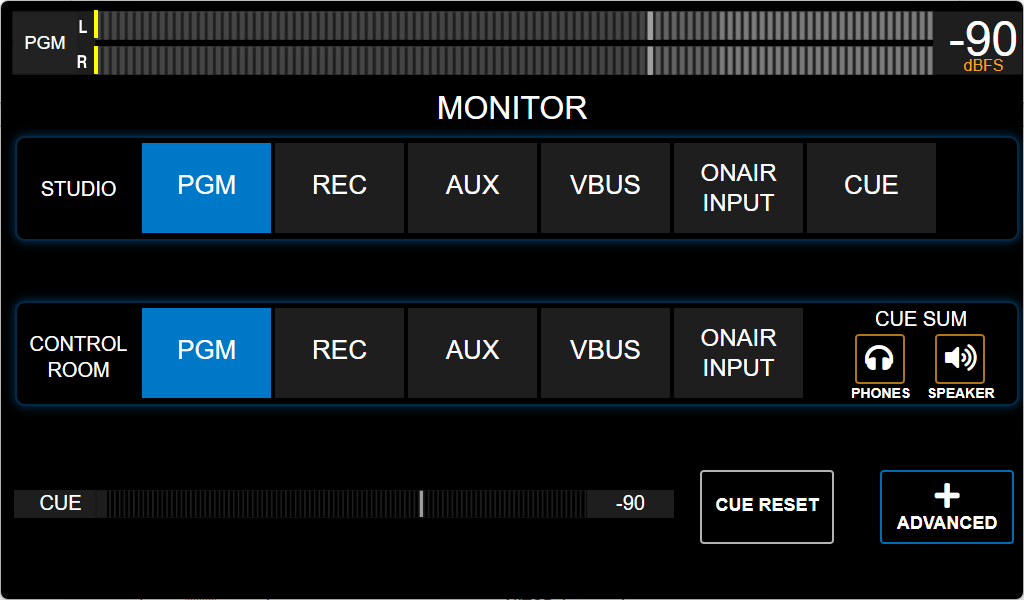
Assignment is done by simply touching each option. The selected option is highlighted in light blue.
STUDIO (Studio Monitoring)
Selects the source sent to the STUDIO MONITOR output.Options:
AIR-IN, PGM, REC, AUX, VBUS, CUE.
- The level for studio speakers and headphones is adjusted from the +ADVANCED option. Usually this level remains fixed and each participant adjusts their own level from a headphone distribution amplifier.
- In single-room radio stations, monitor speakers can be connected to the Control Room output to take advantage of the physical volume knob.
CONTROL ROOM (Control Room Monitoring)
Selects the source sent to the CONTROL ROOM speakers and headphones.Options:
ONAIR-IN, PGM, REC, AUX, VBUS.
Control Room Speaker Muting:
When using a microphone in the Control Room, the control room speaker output can be configured to mute when activated (see Channel Screen).
This is also used in single-studio or “hot cabin” stations by connecting the monitoring speakers to the Control Room output and configuring all microphones as “located in Control Room” to enable automatic muting.
When using a microphone in the Control Room, the control room speaker output can be configured to mute when activated (see Channel Screen).
This is also used in single-studio or “hot cabin” stations by connecting the monitoring speakers to the Control Room output and configuring all microphones as “located in Control Room” to enable automatic muting.
- When active, the CUE signal is summed with the monitored signal.
- The main signal is automatically attenuated when a CUE signal enters.
- The attenuation level is configured in the +ADVANCED screen.
CUE Level
The screen shows a dBfs-calibrated meter that reflects the level after the CUE control. If the attenuator is closed, there will be no indication. CUE RESETTurns off all active CUE buttons on the console.
MONITOR: +ADVANCED
Shows level controls and advanced settings for monitoring signals.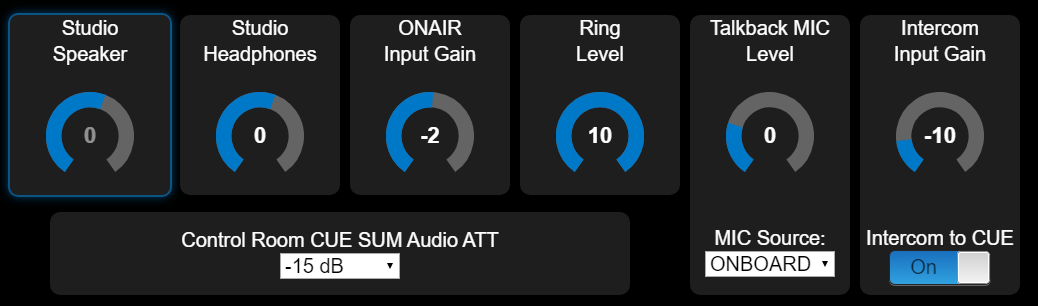
To change a value, touch the control and turn the encoder. Press the encoder to confirm.
Adjusts the signal level for speakers connected to the Studio Monitor output.
The output is line level, designed for active speakers. Studio Headphones
Adjusts the signal level for headphones connected to the Studio Monitor output.
It is designed to feed a headphone distribution amplifier. ON-AIR Input Gain
Controls the gain of the Air Monitor Input (external tuner). RING Level
Level of the “ring” tone in CUE, generated by the console when a call comes in through landline or Bluetooth. Talk-Back Mic Level
Adjusts the level of the talk-back microphone to Studio monitoring, Intercom and telephone lines. Talk-Back Mic Source
Defines the microphone input used for talk-back (Studios, TELCO and Intercom).
Options:
- Built-in ambient microphone.
- Microphone inputs 1 to 4.
- UNIDEX-4 L and UNIDEX-4 R.
- DANTE #1 (when available)
Sets the attenuation of the signal being monitored in the Control Room when a CUE signal overlaps in speakers and/or headphones.
This attenuation also applies when activating a talk-back button (to studios or telephone line) or an Intercom.
Control room, Master-MIC and talk-back
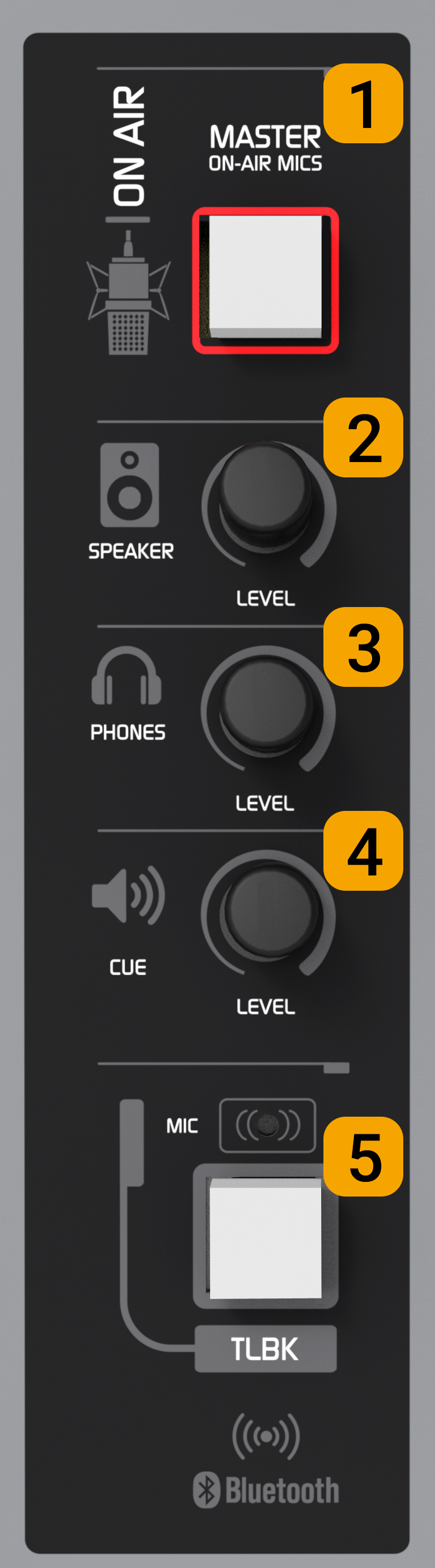
MASTER ON-AIR MICS (1)
Simultaneously activates/deactivates all microphone channels and groups assigned to the MASTER button.Control Room Monitor Level (2)
Rotary attenuator that adjusts the level of speakers connected to the Control Room output.The output is line level for active (powered) speakers. The maximum level achieved will also depend on the monitors’ own settings.