

INTRODUCTION
The hybrid channel handles two phone lines:- A landline (2-wire, also known as ).
- A cellular phone via Bluetooth.
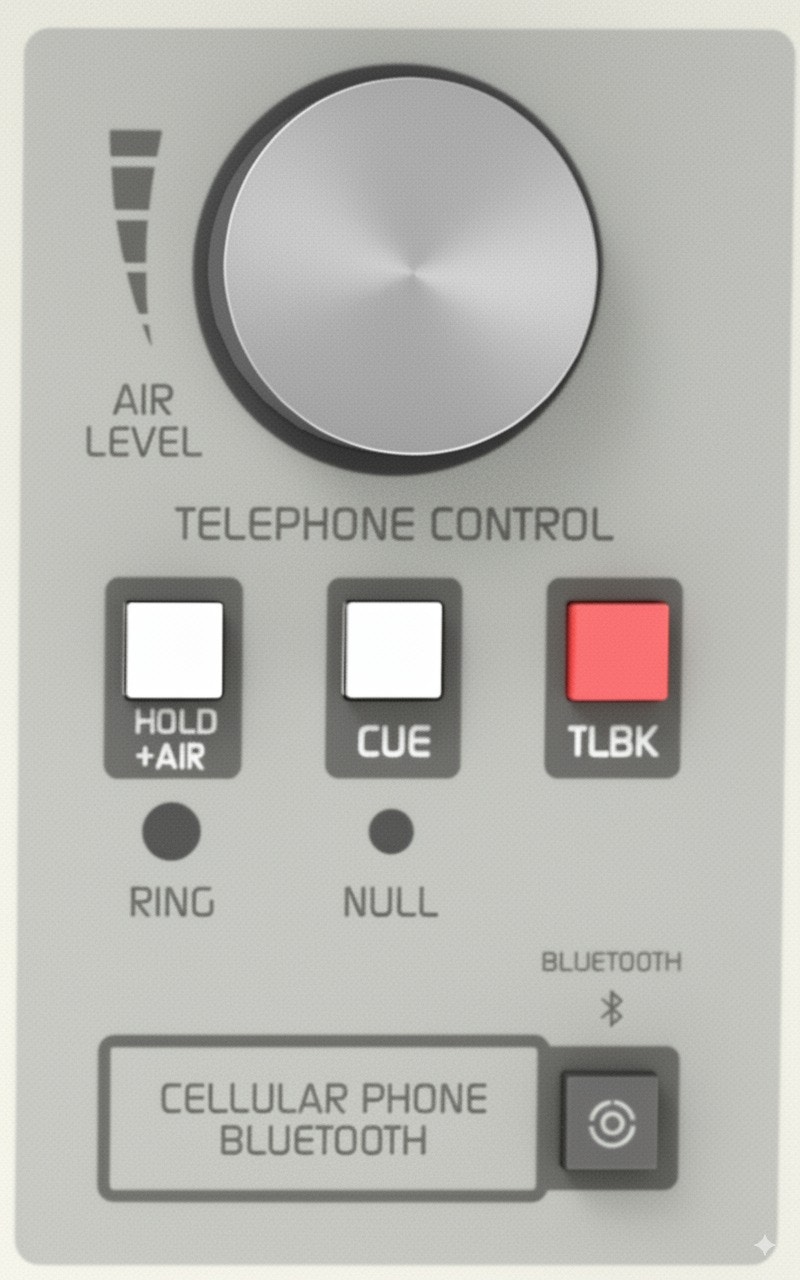
USING WITH LANDLINE
When a call comes in, a blue LED flashes with the ring cadence. You can answer:- From the associated telephone (recommended).
- From the console’s hybrid.
Answering from the associated telephone
- Pick up the handset connected to the D612’s rear RJ11.
- To put the call on air: press HOLD/AIR and hang up the phone.
Answering from the console
- Verify that the AIR LEVEL knob is closed before taking the line.
- Press HOLD/AIR.
- The line is taken and the pilot light turns off.
- The caller receives PGM return and can go on air when AIR LEVEL is opened.
Private communication
- Press CUE: PGM to the line is interrupted and the caller is heard through the CUE speaker.
- To talk: hold down TALKBACK, using the console’s talkback microphone.
Putting the call on air
- Release CUE.
- Turn AIR LEVEL and adjust to the appropriate level.
Return to private mode
- Close AIR LEVEL and use CUE (listen) and TALKBACK (talk).
Return to associated telephone
- Lower AIR LEVEL to zero.
- Pick up the handset.
- Release HOLD/AIR on the console.
If the phone is hung up when releasing HOLD/AIR, the call will end.
End the communication
To end the communication, close AIR LEVEL and release HOLD/AIR.USING WITH MOBILE PHONE
The mobile phone must be paired with the D612 console via Bluetooth.Daily connection
- Verify that AIR LEVEL is closed and CUE is pressed.
- Activate Bluetooth on the console: hold down CELLULAR PHONE BLUETOOTH for about 5s until the green LED (located on the VU meter panel) flashes slowly.
- Activate Bluetooth on the mobile phone.
- If previously paired, the connection is automatically restored.
- Incoming calls are transferred directly to the console.
Incoming call (mobile)
- When a call comes in, it rings on the mobile phone and CUE speaker (if CUE is pressed).
- Verify that AIR LEVEL is closed.
- Answer with a short press on CELLULAR PHONE BLUETOOTH (or from the mobile screen).
Call handling
- With CUE pressed, the call is heard on CUE speaker (without PGM return).
- To talk: hold TALKBACK.
- When releasing CUE, the caller hears PGM, but won’t go on air until AIR LEVEL is opened.
- To put on air: open AIR LEVEL and adjust level on VU meters.
Return to mobile
- On the mobile phone, exit Headset/Bluetooth mode and switch to Speaker.
- To transfer back to console: return to Headset.
Depending on the model, the menu may show “Headset” icons, dropdown buttons or different combinations. Check the phone’s manual.
End the communication
- Short press CELLULAR PHONE BLUETOOTH, or end from the mobile phone.
Calling from mobile
- On the mobile phone, switch to Headset mode to disconnect from console.
- Dial the number and press SEND.
- To transfer the call to console: return to Bluetooth/Headset mode.
- On the console: release CUE to send PGM return to mobile.
- Open AIR LEVEL to put on air.
You can also call without exiting Bluetooth mode, using Talkback:
- Tone and voice are heard in CUE.
- Talk with Talkback.
- For hold: keep CUE active.
- For air: open AIR LEVEL.
- To end: short press CELLULAR PHONE BLUETOOTH or end from mobile.
CONFERENCES
When using landline and mobile simultaneously:- On mobile: Disconnect Bluetooth from console after each call. This way, if a call comes in, it rings on the phone.
- If mobile Bluetooth remains connected to console, an incoming call could ring on air while landline is open.
- With mobile phone on air
- With landline on air
- Receive or make call through telephone associated with landline.
- Talk and warn they’ll go directly on air.
- Press HOLD/AIR to send to air and hang up phone.
- If phone allows, you can mute microphone before hanging up to avoid noise.
- Call enters conference with mobile already on air.
PGM send to phone line
The hybrid built into D612 has no line return level control.- Send is automatic, with AGC and limiter.
- Send signal is limited to 400-2200 Hz band, optimized for intelligibility.
- This prevents distortion caused by excess return.
- To ensure quality: maintain VU meter at 0 VU with occasional peaks above zero.