

Description
D612 consoles feature three stereo line channels.The image shows the USB digital channel.
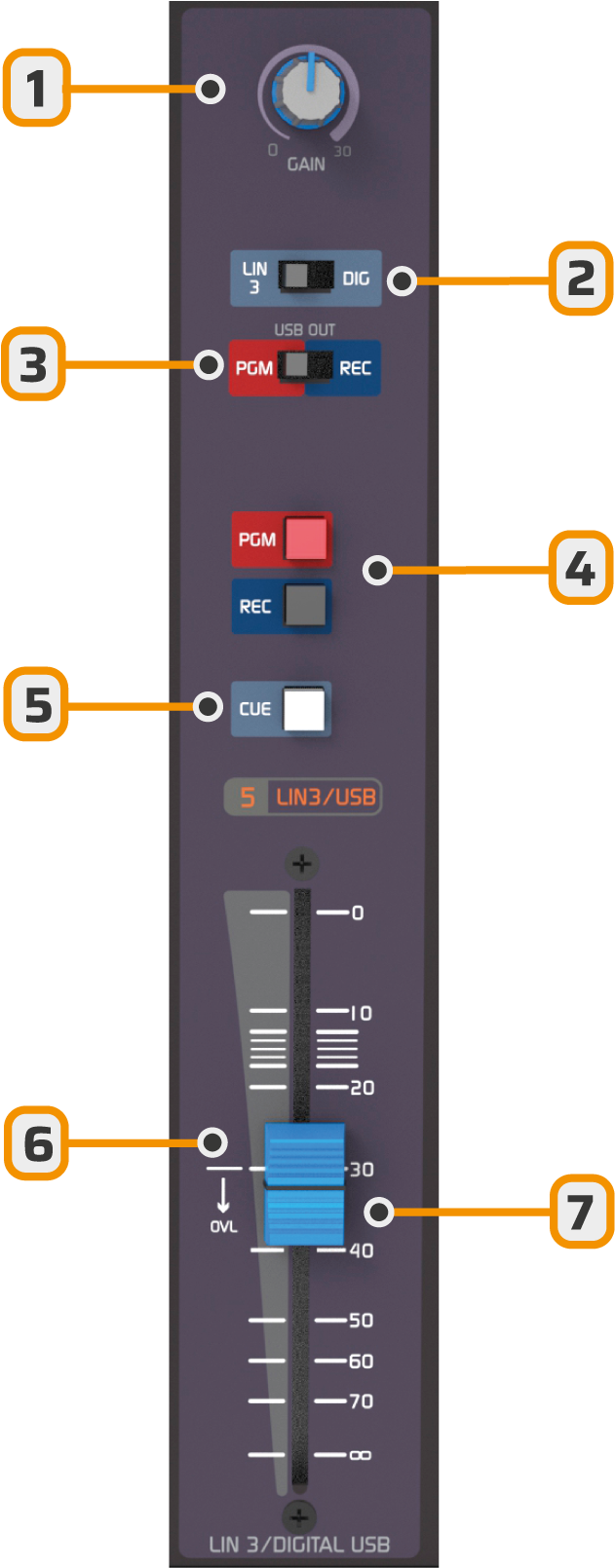
- Channel gain adjustment.
- A/B: Switch between main and auxiliary inputs.
- USB OUT: USB send assignment: PGM or REC (USB channel only)
- BUS: Assignment to PGM and REC buses/outputs.
- CUE: Activates pre-fader listening ()
- OVL: indicates correct operating zone. If the fader is below this indicator, it shows excessive input gain.
- Fader: Main level control. Should operate in the zone marked between -20 and -10 dB.
Channel Inputs
Each channel has two inputs, switchable from an A/B key on the front panel.The USB connection also digitally sends PGM or REC to the computer.
Gain Adjustment
- Each channel has a gain knob.
- For USB signal, the level is adjusted from Windows.
- Adjustment should be made so that, with 0 VU meter level, the main fader operates above the overload zone (OVL).
Operation Use
- To send a signal on air:
- Assign PGM on the channel.
- Raise the fader.
- The correct operating level is achieved when signal peaks reach 0 VU.
Fader Technology
All channel faders operate with VCA technology and use high-durability soft-touch attenuators.- The fader handles direct current (DC) levels, which control a variable gain amplifier.
- This system guarantees ultra-low distortion.
- Completely eliminates noise produced by mechanical wear of faders.
- + 10,000,000 operations under proper use conditions.