

Control Description
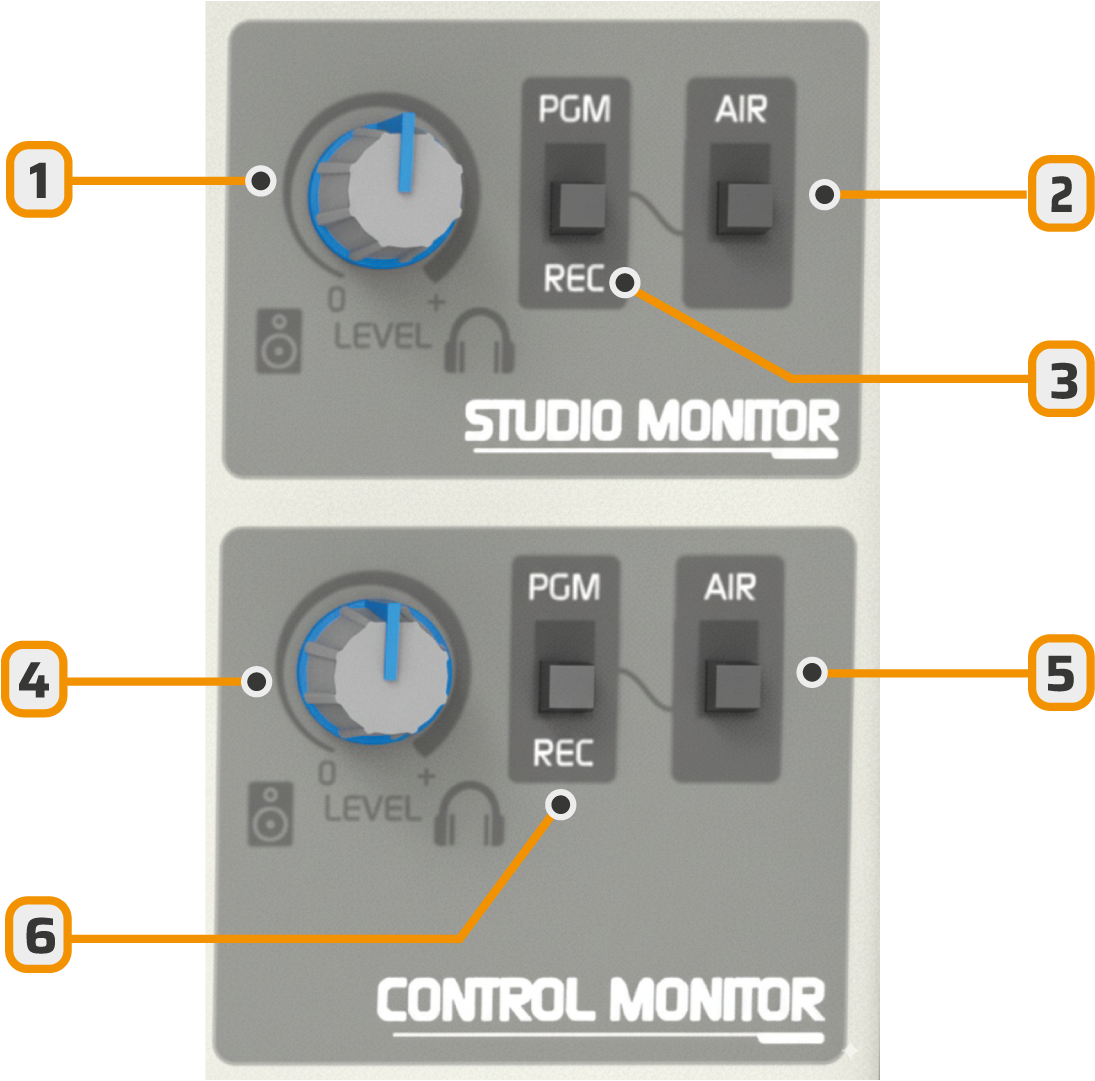
- Studio monitors and headphones level
- Studio monitoring switch between external ‘ON AIR’ input (external tuner) and PGM/REC
- Assigns PGM or REC mix to Studio monitoring
- Control Room monitors and headphones level
- Control Room monitoring switch between ‘ON AIR’ (external tuner) and PGM/REC
- Assigns PGM or REC mix to Control Room monitoring
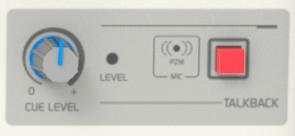
- CUE: adjusts the CUE signal preview level.
The built-in speaker can be disabled and the CUE signal routed to the control room headphones.
This requires modifying an internal connection. See Installation - Speakers and headphones
This requires modifying an internal connection. See Installation - Speakers and headphones
Level Adjustment
A single level control manages both studio headphones and studio monitor speakers.- First adjust the headphones level.
- Then adjust the speaker level using the active monitors control.
Individual Headphone Control Options
- External amplifier/distributor (recommended): for example the Solidyne Studio Box HD5 which handles 5 headphones.
- Headphones with built-in volume control.
- Custom individual control: mount a 1 kΩ potentiometer on the announcer’s desk (see Installation chapter).
Studio and Control Room Speakers
- The Studio Monitor output is designed for active speakers (0 dBu level, 0.775 Vrms).
- When microphones are activated, studio speakers are automatically muted to prevent feedback.
- The Control Monitor output also has a single level control.
Monitor Signal Selection
The selection switches choose which signal to monitor in Studio and Control Room- PGM: program signal.
- REC: channels assigned to recording output.
- AIR: external input (tuner) for monitoring on-air transmission.
Operation in Integrated Studios
In modern studios, console, announcers and journalists share the same room, reducing construction and acoustic costs.- Connect a pair of active speakers to the Studio Monitor output.
- These are automatically muted when microphones are opened.
- Journalists’ and guests’ headphones connect to the Studio output.
- Operator’s headphones connect to the Control Monitor output.
Preview Monitoring (CUE)
- The console includes an internal speaker for CUE.
- Each channel has a CUE button to preview the signal without going on-air (fader closed).
- If multiple CUE buttons are pressed, signals are summed.
- CUE configuration must be modified to send the signal to Control Room headphones and mute the built-in speaker. See Installation - Speakers and headphones
Studio Talkback
The talkback channel allows the operator to communicate with the announcer in the Studio:- Press Talkback.
- Audio is interrupted in Control Room speakers (to prevent feedback).
- In the Studio, the operator is heard through the left channel of speakers and headphones.
- The right channel continues with program audio so announcers and journalists maintain reference.
- To hear the response, the operator must activate CUE on the microphone channel.
The talkback microphone level comes factory calibrated.
Only if necessary, it can be adjusted with the LEVEL preset on the console panel using a trimmer tool.
Only if necessary, it can be adjusted with the LEVEL preset on the console panel using a trimmer tool.