

Control Room Monitoring
The CONTROL outputs feature 1/8” female TRS (mini-jack) connectors for speakers and headphones. The speaker output operates at a nominal level of 0 dBu, designed for connection to active monitors.In the console’s MONITOR section, you’ll find the controls for signal routing and level adjustment for both speakers and headphones.
The Control Speaker output is automatically muted when Talk-back is engaged, preventing feedback with the announcer microphone.
Studio Monitoring
The console delivers monitoring signals to the Studio via STUDIO MONITOR OUT, with an RJ45 connector. The connection is made using straight-through STP RJ45-RJ45 cable to the optional Solidyne Studiobox HD3/HD5 monitor units.This output must not be connected using standard audio output RJ45 cables.
It is not compatible with the StudioHub standard.
It is not compatible with the StudioHub standard.

- Studio speakers automatically mute when microphones are opened.
- The headphone signal is never muted. It always receives the console-assigned signal and the talkback microphone audio.
Single-Booth Monitoring
When the console is used in an integrated or single-booth studio, it is advisable to connect the speakers to the STUDIO MONITOR output.Optional Studiobox Connection
The console includes a Y-cable adapter (RJ45 to dual TRS jack) for connecting generic headphone distribution amplifiers and powered monitors.- The STUDIO MONITOR output delivers fixed-level signals
- When not using Studiobox, speaker level is adjusted from the monitors’ own controls
- A dual-input headphone distribution amplifier may be used to control monitor volume from the console
- Input A → headphone signal
- Input B → speaker signal
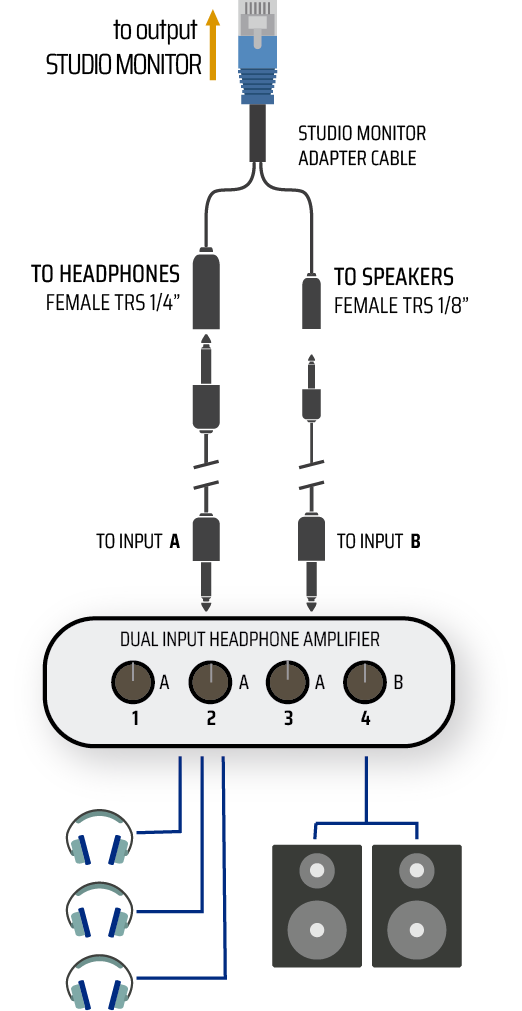
Studio Monitor Out
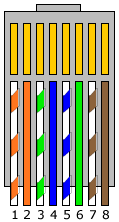
Chassis = GND