

Monitor Section
This section contains the controls:- Studio Monitor: determines which signal will be heard in the studio monitors and headphones.
- Control Monitor: assigns the signal to the control room monitors and headphones.
- CUE volume control.
- Talk-Back button and microphone to the studio.
- Master “ON-AIR Mics” button. Activates the microphone channels and “ON-AIR” signals.
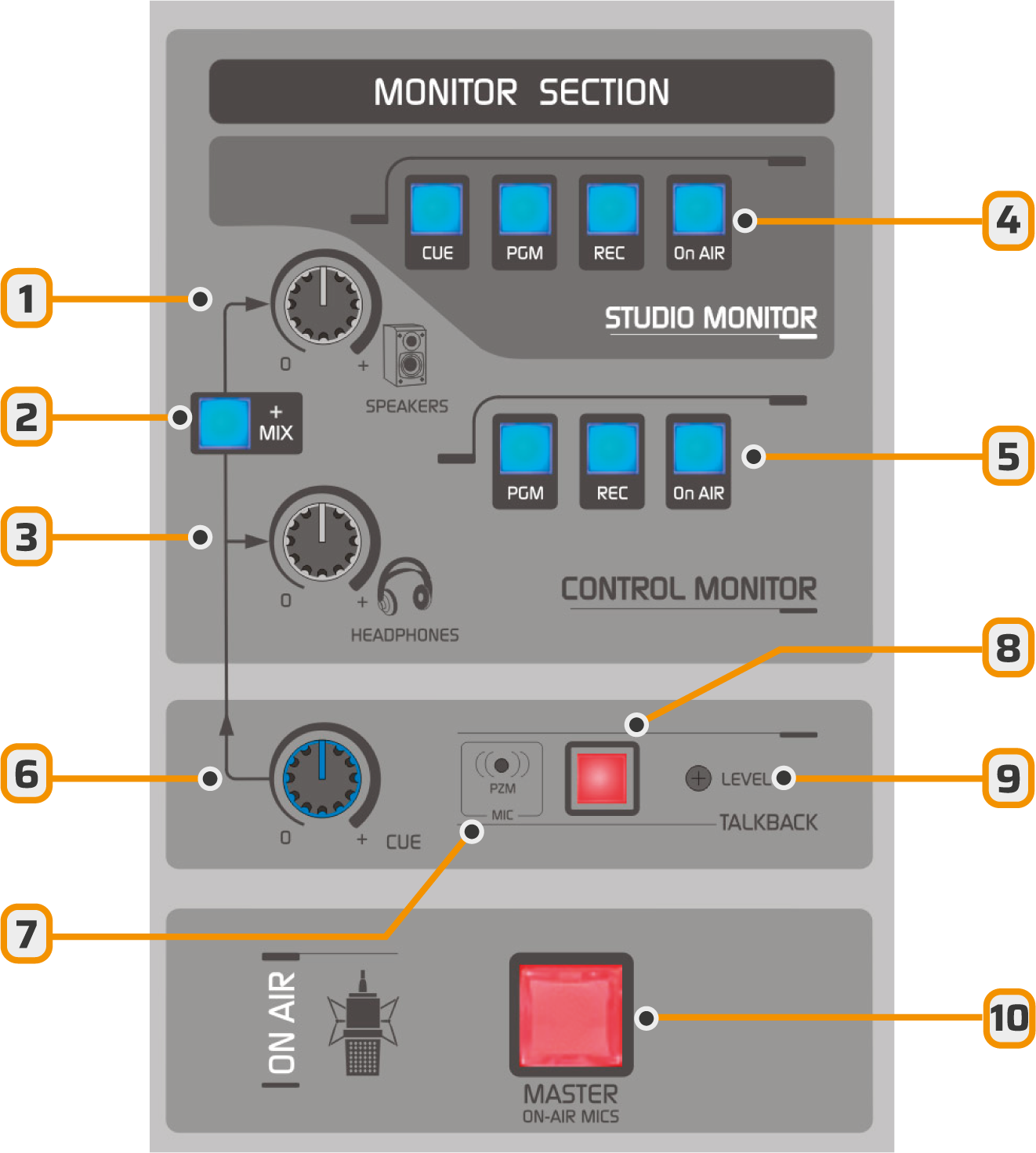
- Control room speaker level control.
- Adds CUE audio to the control room speakers.
- Operator headphone level control.
- Signal assignment to the studio monitor output (headphones and speakers).
- Signal assignment to the control room monitor output (headphones and speakers).
- Level at which the CUE signal is added to the control room headphones and speakers.
- Talk-Back microphone (studio communication and intercom).
- Talk-Back button
- Talk-Back microphone sensitivity
- Microphone master button.
Studio Monitor
- Provides four signal sources: CUE, PGM, REC, and ON-AIR [4].
- The console delivers fixed-level signals to both headphones and studio monitors.
- For level distribution and control in the studio, a headphone distribution system is required, such as the optional Solidyne HD3 and HD5 modules.
See wiring in Installation ⟶ Monitoring
Control Monitor
- The headphone [3] and speaker [1] levels are managed with independent controls.
- Using the selection buttons [5], choose the signal to monitor:
- PGM: signal sent on-air.
- REC: signal from the REC auxiliary bus.
- ON-AIR: signal from an external tuner, recommended for on-air monitoring.
Adjust the monitor speaker volume to a comfortable level with the SPEAKERS control in the center position.
If the Studio–Transmitter link or the audio processor introduces an audible delay, it is recommended to process the ON-AIR monitor signal with a delay-free processor, connected directly to a PGM output of the console.
Pre-fader Listen (CUE)
Each channel features a CUE button that allows monitoring the signal before the fader (off-air). When multiple CUEs are activated, the signals are summed. The CUE signal can be routed to:- Control Room monitor speakers: press the MIX button [2].
- Control Room headphones. This routing is fixed. CUE is summed with the signal assigned by the monitor selection.
- Studio Monitor. It’s available as a signal source in STUDIO MONITOR.
- CUE routing is monophonic.
- To isolate CUE monitoring:
- Lower the SPEAKERS or HEADPHONES level as needed.
- Release PGM, REC and ON-AIR buttons.
Talkback to Studio
The talkback channel allows the operator to communicate with the announcer in the studio.- Press the TALK-BACK button.
- Program audio in Control Room speakers is interrupted to prevent feedback.
- The operator is heard on the studio’s left channel.
- The right channel maintains the on-air signal for announcers’ and reporters’ reference.
- It’s also possible to activate CUE on the microphone channel to communicate with the announcer.
The talkback microphone level is factory-calibrated.
It should only be adjusted when strictly necessary, using the LEVEL preset.
It should only be adjusted when strictly necessary, using the LEVEL preset.