

Audio Stream Generated from Another Console
The AoIP module can be configured to receive an RTP stream generated from another Solidyne console with streaming support (e.g., D612, 2600 series, Unidex series, coder/link ADA102).The encoding equipment must have the same firmware (STL). By default, the console comes in CODER (Studio Encoder) mode. To receive, it must be configured as DECODER.
Receiver Configuration (Decoder)
- Access the IP module from a web browser (see IP Module Access).
- In the top menu, click Location.
- **Change **the mode to → Transmitter Decoder.
- Factory setting: Studio Encoder, generates a unidirectional streaming.
- As Decoder, default values are adopted (only modify IP and ports).
- Go to Configuration → Streaming.
- In Port, enter the port used on the encoder (the transmitting equipment).
- In URL, keep 0.0.0.0.
- Click Apply to confirm.
Buffer Adjustment (RTP Delay)
The input buffer (expressed in milliseconds) prevents audio interruptions when bandwidth is insufficient:
The audio format is always defined by the transmitting equipment.
Decoded Audio Connection
- Audio received via Ethernet is routed to balanced inputs using the external cable (RJ45 to RJ45, provided).
- Connection: AoIP Output Option → BAL-1 or BAL-2.
- For DX822 with two AoIP modules: branched output to both inputs (BAL-1 and BAL-2) using a special “Y” cable (supplied).
Reception Using a Computer
It is possible to receive transmission from a DX/AoIP on a computer with compatible RTP software.Recommended: VLC Player (free – videolan.org/vlc). Format Configuration in VLC:
- PCM16 @ 44.1 kHz, or
- MP3 in one of its modes.
- Menu: Media → Open Network Stream.
-
In the URL field, enter:
[protocol]://[source_IP]:[port]
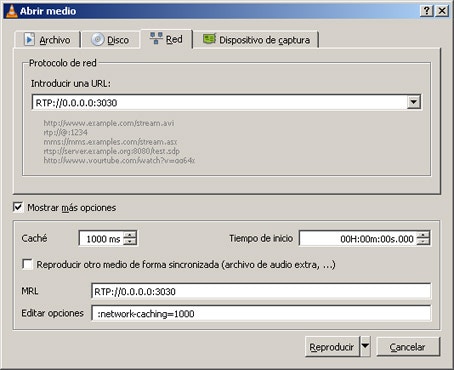
RTP→ protocol.0.0.0.0→ any incoming IP.3030→ port used.
Some versions of VLC accept:
RTP://@:3030