

General Features
The DX series microphone modules feature 3 channels, though 5 microphones can be connected via the rear panel. ⟶ The MIC-2 and MIC-3 inputs allow for a second microphone connection (MIC-4 and MIC-5). ⟶ Faders 2 and 3 control two microphones simultaneously when the MIC-4 and/or MIC-5 inputs are connected. The DX822 model includes two 3-microphone modules. It handles 6 microphone faders and supports up to 10 microphones (4 dual inputs).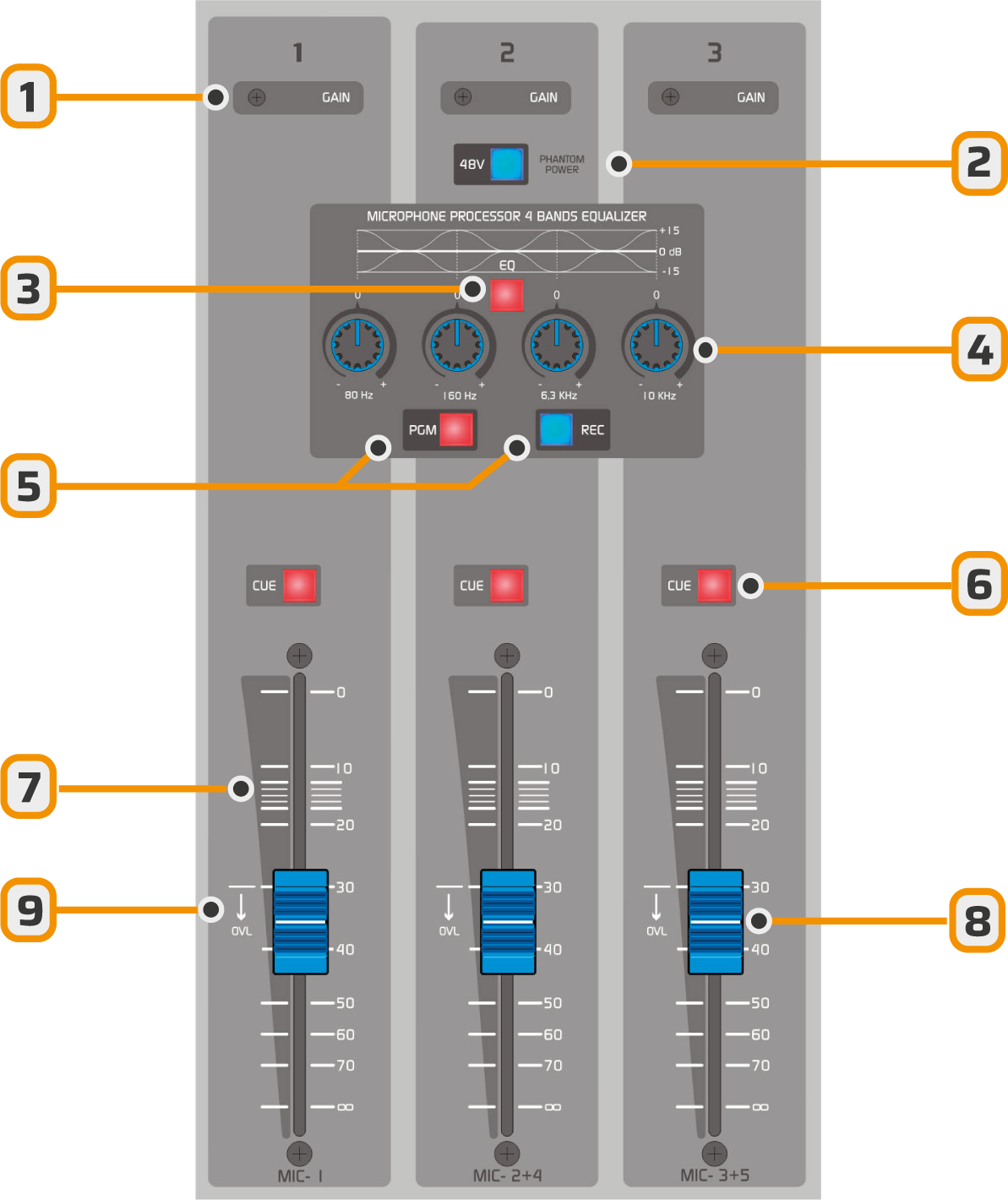
- Gain Preset. Should be adjusted so the fader operates above the OVL (–30 dB) overload mark. ⟶ Operating below this level causes unnecessary amplification, leading to peak clipping. ⟶ Ideally, operate with the fader within the optimal zone (–10 to –20 dB).
- Phantom 48V power. Activates/deactivates for all module inputs.
Dynamic microphones can be safely connected to 48V phantom inputs, as their internal transformer blocks the DC voltage.
- EQ. Enables/disables equalization for all microphones in the module.
- EQ. Gain controls for frequency bands.
- BUSES: Assignment to PGM and REC output buses. Microphones are assigned collectively to PGM, REC, or both. Assignment is post-EQ.
- CUE: Sends a pre-fader signal to the cue circuit. Activated per channel.
- Operating zone: This area indicates the correct working position for nominal signal level and proper input gain adjustment.
Gain should be set so the fader operates above -30 dB. The OVL (9) indicator signals overload, i.e., excessive input gain. - Main fader. Adjusts the signal level in the mix. In addition to raising the faders, the MASTER MIC button located to the right of the faders must be pressed to enable microphones.
Equalization
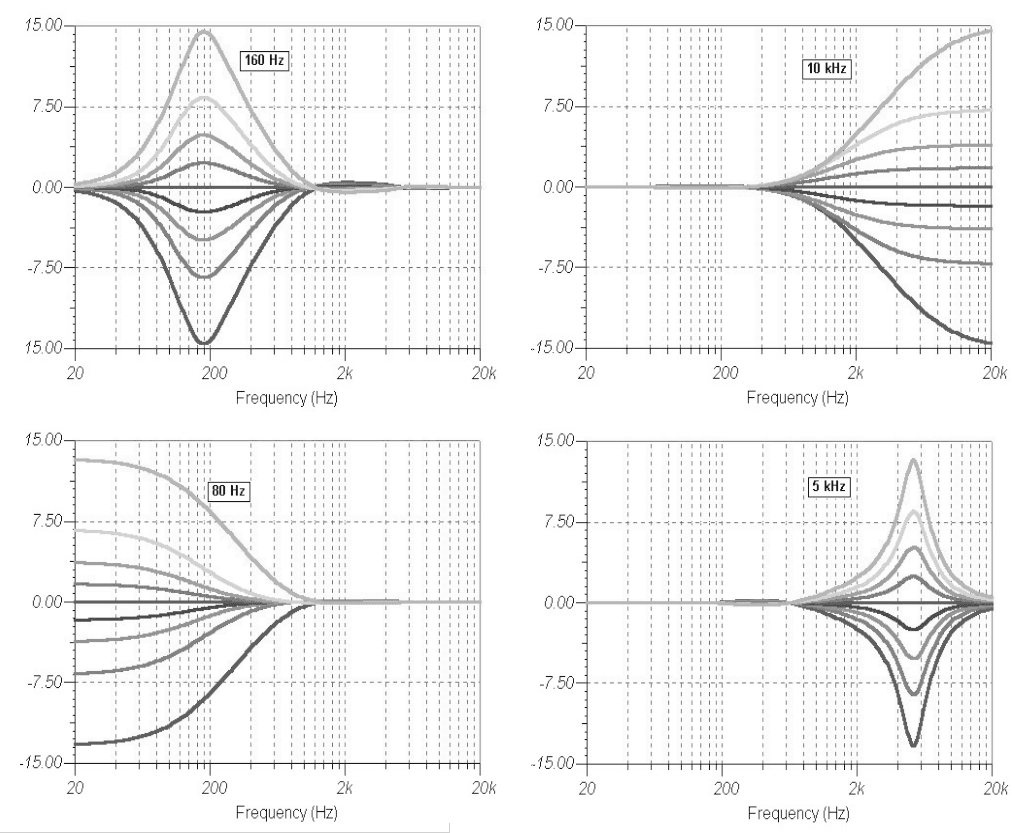
The equalization is global and affects all microphone channels. The purpose is to allow general equalization adjustments that respond to the room’s acoustic characteristics, which are common to all microphones. EQ Features:- Bands 1 and 4 (low/high frequencies): in Shelving mode, range ±15 dB.
- Band 2: Peak EQ. Centered at 160 Hz. Can soften the “popping” effect.
- Band 3: Centered at 6.3 kHz. Can soften the “sibilance” effect and sibilant sounds.
Compression
The dynamic compressor reduces large level variations in microphones.The design avoids audible artifacts and simplifies operation. Simply raise the microphone fader levels until the VU meters reach the red zone.
- Acts on the microphone channel mix.
- Cannot be disabled.
- Engages when the signal exceeds 0 VU.
- Below this level, the signal is unaffected.
- Compression ratio: 10:1, with fast attack and release times.
- The compressor will reduce gain by a value indicated on the MIC Compressor meter.
- Compression values of 5 to 15 dB are optimal when operating multiple microphones simultaneously.