

Hybrid Channel Operations
The TELCO channel centralizes telephone communications. It includes a 2-line telephone hybrid, a Bluetooth link to pair a mobile device, and can add VoIP communication from a computer via USB-2. All three (or four, including VoIP) can be conferenced together. Additionally, more lines can be added using an external hybrid. These lines do not consume extra console channels, as they feed directly into the TELCO channel, which acts as a MASTER control for putting external lines on-air.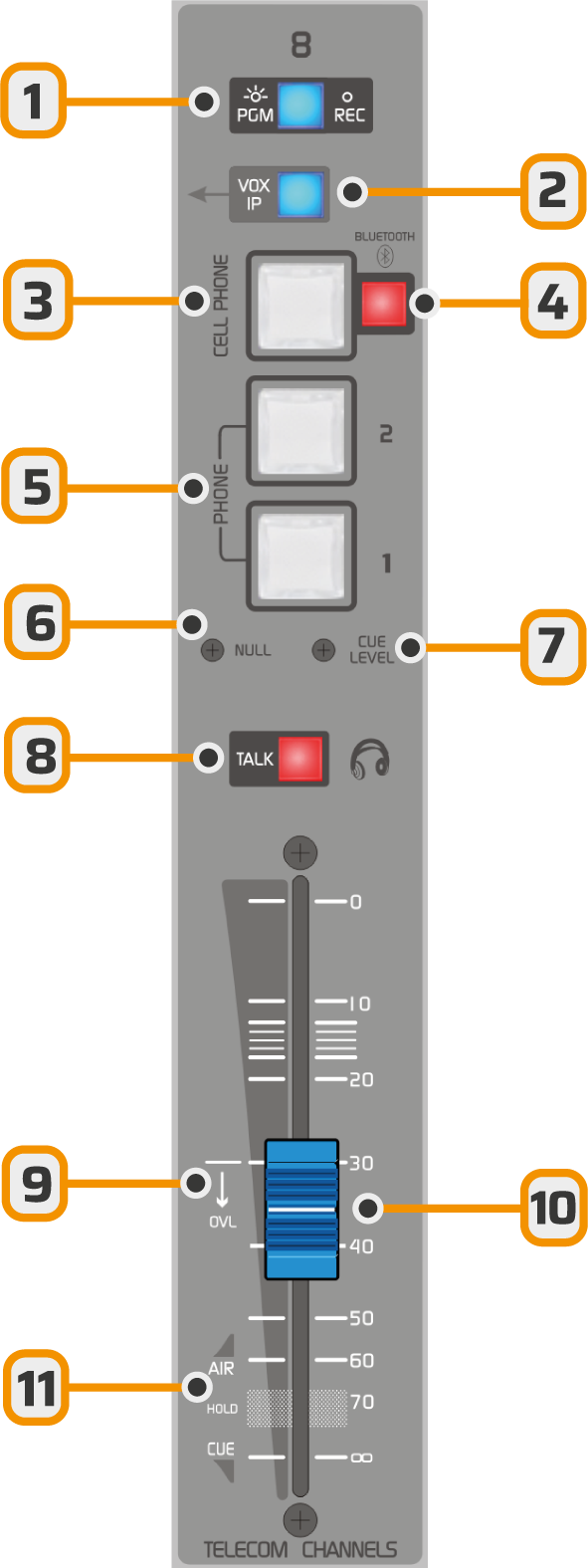
Panel Controls
- PGM-REC. Assigns the TELCO channel to PGM or REC outputs. REC enables call recording (assigning microphones to REC) while another source is being broadcast on-air.
- VOX-IP. Sends telephone line returns to the USB-2 port (REC bus). This configures a mix-minus for communication applications running on the computer, which receives returns from active sources in TELCO (landlines, Bluetooth mobile, external hybrid).
- Bluetooth Channel. On-air button for the Bluetooth device.
- Bluetooth Control. Activation button and mode selector for the Bluetooth interface.
- Hybrid Channels. Control buttons for the telephone hybrid’s landlines.
- NULL. Adjusts rejection for landlines.
- CUE Level. Adjusts the level for cue monitoring. This is an installation setting and typically shouldn’t be modified during normal operation.
- TALK. Enables the Talk-Back microphone to speak to telephone lines. It’s latching; press again to turn off.
- The OVL indicator marks the beginning of the proper operating range. Gain adjustment for landlines is automatic. For Bluetooth, it depends on the phone’s level setting, which should be adjusted so the attenuator operates above -30 dB.
- Main Attenuator: Adjusts call levels in the mix.
-
HOLD-CUE: Automatic system that changes call mode based on fader position.
- a) When the fader is closed, the call routes to the CUE circuit. The operator can speak to the line by pressing TALK [8] and monitors through the CUE channel.
- b) When the fader is in the dotted HOLD zone, the call is HELD. PGM audio (or REC depending on assignment) is sent to the line, but the line isn’t broadcast on-air.
- c) Above the HOLD zone, the call is broadcast on-air at the level determined by the fader.
Operating Modes
- A) Operator-Presenter: The host simultaneously operates the console and takes/manages on-air calls.
- B) Production: Producers/phone operators receive/generate calls and transfer them to the control room.
Case A – Host-Operator (Step by Step)
- Call Incoming: The line button flashes blue when ringing.
- Answer: Press the line button → turns red. For mobile, press CELL PHONE [3] (requires prior Bluetooth pairing).
- Pre-listen and Private Talk:
- Keep the fader closed in CUE [11] position.
- The caller hears program (or REC, as assigned); the line is heard in CUE.
- Press and hold the TALK [8] button to speak (control room speakers mute; headphones remain active). Uses the Talk-Back microphone.
- Hold: Move the fader to the HOLD zone → the call is held listening to program; disconnects from CUE.
- On-Air / Conference: Raise the TELECOM fader to appropriate level on VU meters.
- All lines with their buttons in red go on-air in conference.
- For individual interviews, keep only one in red.
- End Call: Lower fader and release (turn off red) the lines.
- For mobile: Press CELL PHONE [3] to remove audio from the channel. To disconnect completely, tap briefly on BLUETOOTH [4]. You may also disable Bluetooth on the mobile device if you wish to continue the call from the phone.
Case B – Production (step by step)
- Phones in Production: Phone-1, Phone-2, and the mobile phone (see connections in Telephone Line Connections).
- Transfer to Control: when handling/managing in Production, notify the operator to take the line from the console (press button). Then hang up in Production.
- Mobile Phone: switch the mobile phone to headset mode (Bluetooth) and notify Control to press CELL PHONE [3]. With the fader in HOLD position, the line remains on hold listening to the program.
- On-air: raise the main fader.
- Cut: lower the fader and turn off the line buttons. On the mobile phone, end the call with a short tap on BLUETOOTH.
- Return to Production: hang up the phone on that line in Production, and then the operator releases the button on the console. On the mobile phone, exit Headset mode on the phone to remove the call from Bluetooth.
Adding a Line to an On-Air Communication
The built-in hybrid system in the DX series is designed to handle one call at a time. If a call is currently on-air, it is not possible to hold a second call on console. However, the system supports establishing conferences between all three lines. When enabling a second line, it immediately joins on-air in conference mode.To work with call waiting functionality, supplement the system by installing an external hybrid connected to the EXTERNAL HYBRID input/output.
The Solidyne HL240 module handles 2 landlines and two Bluetooth cellular lines with independent call waiting and mixing levels.
The Solidyne HL240 module handles 2 landlines and two Bluetooth cellular lines with independent call waiting and mixing levels.
- To add a line to conference (when a call is already on-air): Production informs the caller they will be joining an on-air conference momentarily
- If the local PBX allows: place the call on hold, notify the operator, and transfer the call to the appropriate extension (recommended)
- The extension rings showing RING on console, operator answers and the call goes on-air
- Without a local PBX: keep the phone off-hook, notify the operator, and once the operator takes the line on console, hang up. This alternative is not recommended as it may produce on-air pops when hanging up in production
For regular call waiting functionality, we recommend adding an external hybrid system to the console or at least configuring an internal PBX to manage calls.
Adding a mobile phone to an on-air communication
- In this case, Production informs the person communicating via mobile phone that they will be going on-air in conference mode momentarily.
- Next, they activate the “Bluetooth hands-free” mode on the screen and notify the operator.
- When the operator presses the CELLULAR button, the mobile line is added to the conference.
For conferencing between two landlines, they must belong to the same public exchange or the same PBX. It is not possible to do this between different exchanges or with different IP converters.
On-Air Call Levels
- When working with landlines, take care not to exceed the TELCO on-air level. Analog hybrids don’t provide 100% cancellation and some PGM signal returns; excessive levels can “smear” studio voices.
- A call doesn’t always need to reach 0 VU to match loudness: telephone signals lack bass frequencies (which make VU meters “peak” more) and loudness is defined by the midrange; the on-air processor will balance levels.
Telephone Line Return
The Solidyne hybrids integrated in the DX series do not have manual send level control to the line. They include return processing with AGC and limiter + filtering (400–2,200 Hz band):- The return automatically adjusts to the maximum level supported by digital exchanges (2 Vpp on the line).
- Simplifies hybrid operation on the console.
- Prevents distortion, intermodulation, and degradation of the rejection factor.
For proper operation, the automatic send level control requires that microphone levels be maintained at 0VU on average (peaks above 0 VU).