

General Concepts
BotNews is a powerful on-air news report manager and generator, designed for stations with a high level of automation.- Works autonomously, without operator intervention.
Interrupts programming to broadcast a news block and then resumes transmission adjusting timing. - Supports playback of remotely sent audio files.
- Uses text-to-speech (TTS) and AI-generated voices to read remotely sent texts.
- Generates its own reports based on predefined topics through web syndication (RSS), which are read on-air by virtual voices.
When a news item arrives, it is immediately scheduled for broadcast, with opener, separators and closer. News files can be received from synchronized FTP folders or email attachments through AUDICOM WebTools functions. To avoid interrupting commercial breaks, BotNews evaluates the remaining time of the current title:
- Only inserts the news if there are more than 25 seconds left to finish.
- Default: 30 seconds (configurable).
- This allows a journalist to modify or replace a file, for example, in telephone recordings or FTP transfers.
BotNews was not designed to be used while the On-Air Screen is in a LIVE block.
Screen and Configuration
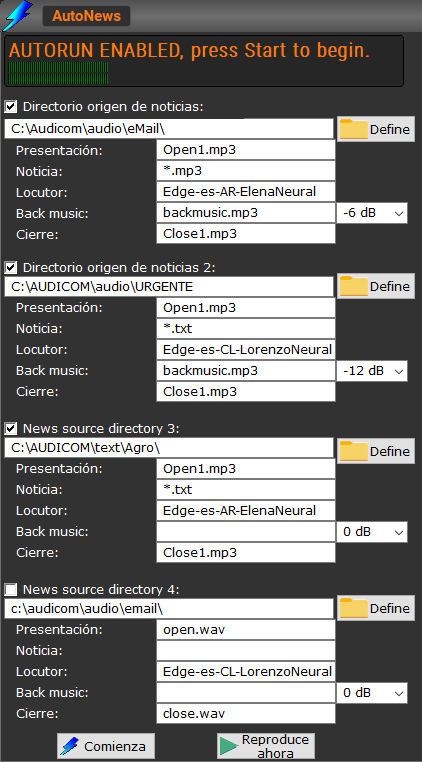
The module is manually launched from the ”+” menu in the toolbar.When started, the following window appears:
-
News source directory:
Up to 4 system folders can be defined as news sources.- If not needed, leave fields empty.
- Recommended to keep them within the AUDICOM folder.
- Can be local or network folders (
UNC).
\Audicom\Audio\OldNewsfolder, renamed as:
If the source folder is on a network drive, write permission is required. Otherwise, the news will loop and be scheduled indefinitely.
- Opening: File played before the report.
Must be in the source folder and included with full name and extension.
If left empty, it won’t play even if it exists. - News: Allows defining a filter to select news files.
Example:
- Announcer: Defines the system voice that will read the texts.
- The field on the right adjusts the attenuation in dB for background music.
- Back music: Audio loop used as background for read news.
- Closing: File played after the news (same logic as Opening).
- Safe Time:
Wait time (in minutes) before validating a newly generated news item. - Useful when a journalist needs to review, confirm or re-record a story.
Main Controls
- Start: Activates BotNews in the background.
- When it detects and validates a news item, it inserts a PAUSE in CyberPlay after the currently playing title.
- When that title ends, BotNews emerges in the On-Air Screen and plays the news block.
- Once finished, AUDICOM resumes programming adjusting timing.
\Audicom\Audio\OldNews and are also recorded in the broadcast logs.
- Play:
Allows during configuration to preview TTS voices and adjust background music level. - Stop:
Interrupts current audio playback or TTS reading.
The BotNews module supports Autorun mode.
If this is enabled in AUDICOM (General Configuration Panel), BotNews will automatically activate if, after launching it, no operation is performed within one minute.
If this is enabled in AUDICOM (General Configuration Panel), BotNews will automatically activate if, after launching it, no operation is performed within one minute.