

- commercial break blocks (green blocks), and
- the head station’s imaging, which is automatically replaced with local equivalents.
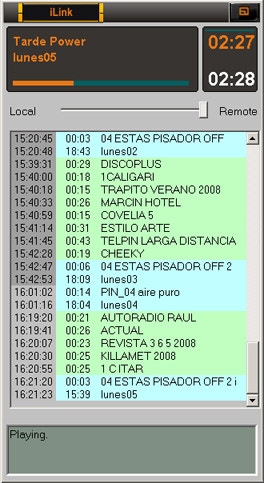
- AUDICOM Multicast installed.
- Broadband Internet access.
iLink playback channel
iLink streaming playback uses Windows’ default playback device.To change it, adjust the default device in Windows sound settings.
Programming iLink events in CyberPlay Editor
At the repeater, schedule an iLink event within the programming (PGM) with the time for linking to the head station. You can create a single iLink block for the whole day or multiple blocks at different times. The iLink block is similar to Live, AutoDj or Satellite blocks. Create it using the Magic Programming wizard, “iLink Block” option.STEPS
-
Create iLink block (Wizard)
Open Magic Programming and choose “iLink Block”.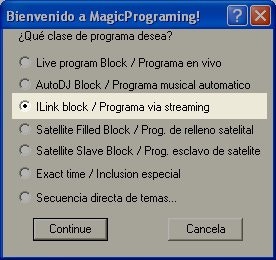
-
Program name (link address)
Enter the streaming access address generated by iRDS at the head station (iLink address field).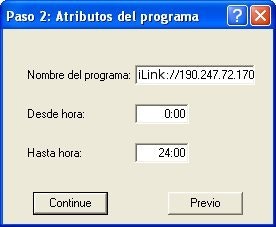
- Example by IP and port:
iLink://190.247.72.170:8081 - Example by server (if iRDS publishes to a server):
iLink://encoder.iviplanet.com/AUDICOM
- Example by IP and port:
-
Unused intermediate step
Click Continue. -
Music format (fill and contingency)
Select the AutoDj format that iLink will use when:
a) The head station break is longer than the regional break → adjusted with songs.
b) Internet is lost → iLink schedules music and maintains regional breaks until reconnection.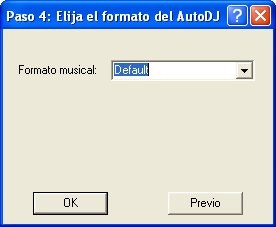
-
Unused final step
Click Continue and save.
/Block /00:00-24:00 /ILink="AutoDj Jazz" iLink://190.247.72.170:8080
You can create multiple iLink blocks with different fill formats according to each head station program’s content.
iLink event with xLink protocol (zero delay)
When delay-free repeater is required, the head station transmits metadata only via xLink, and audio reaches the repeater through a physical connection (analog or digital) to its line input. The repeater receives metadata via LAN and replaces spots and imaging locally. In the repeater’s PGM, schedule an iLink instruction in xLink mode:/Block /08:00-14:00 /ILink="autodj format" xLink://url/soundCard/input
Parameters:
- URL → IP of server with iRDS/xLink active. Ex.:
192.168.0.50(default port8088). - Sound card → name of input device. Ex.:
Realtek High Definition Audio. - Input → device’s source. Ex.:
Line In.
You can also define xLink device and input in the configuration file to avoid repeating them in each block.
\[Hardware] section with:
xLinkDeviceIn=HD Audio device
xLinkLineInName=Line In/Block /08:00-14:00 /ILink="Latinos" xLink://192.168.0.50/Realtek High Definition Audio/Line In
Commercial break replacement (iLink)
During an iLink event, AUDICOM plays the head station’s stream.When the head station enters a commercial break, iLink interrupts the stream and airs the regional break.
There must be the same number of breaks at the head station and regional station.
Number of breaks: behaviors
- Head station has more breaks than regional: when all regional breaks finish, it returns to head station audio; regional breaks are not repeated nor additional fill generated.
- Head station has fewer breaks than regional: remaining regional breaks are ignored.
Individual break duration: automatic adjustments
Usually break durations are pre-agreed. If they don’t match, iLink acts as follows:Head station longer than regional → fill remaining time
Level 1 (Music): attempts to cover the difference with songs according to the AutoDj format defined for the iLink block. If exact adjustment isn’t achieved (very common if difference is < ~3 min), moves to Level 2.Level 2 (Promos): fills with
Class=Promo files based on remaining time. If remainder is too short for a promo (usually >2-3 s), moves to Level 3.Level 3 (Fills): fills with
Class=Fill (stingers/effects of 1-5 s approx.). Being brief effects, AUDICOM can trim them finely if needed (rare).
Head station shorter than regional
iLink plays the complete regional break then returns to head station.Avoid this scenario: the head station block will “join in progress”.
Programming against “classic” streaming
You can link to a head station without AUDICOM (or an Internet program). The block is set up like iLink, with these exceptions:- Use
mms://scheme instead ofiLink://. - No remote break control: local breaks air at exact times per LOG/PGM.
/Block /22:00-23:59 /ILink="Pop Fill" mms://encoder.your-server.com:8080/RadioDemo
Promotional cut replacement (head station imaging)
You can define replacement of promos/IDs from head station with regional imaging.Ex.: when
BsAs_identification-1 plays at head station, Cba_identification-1 plays in Córdoba.
Prefix rule: head station files to replace share a prefix, e.g. BsAs_.Regional files use another prefix (e.g.
Cba_) and must have equal duration (tolerance ±0.5 s). If duration doesn’t match, replacement doesn’t occur.
Only files scheduled in programming and those launched from Live Assist on main channel (not in MIX mode) are replaced. If triggered “over” music, replacement doesn’t occur.
Where to place regional files
Place replacements in:C:\Audicom\Audio\Replace
Know the duration of head station cuts to replace and prepare at least one equivalent regional file.
/replace instruction within iLink block
Only one /replace criterion per iLink block. Variants:
/replace ORIGINAL=
Replaces exactORIGINALfile with any file inReplaceof equal duration./replace ORIGINAL*=
Replaces all starting withORIGINALwith any inReplaceof equal duration./replace ORIGINAL*=REPLACEMENT
Replaces all starting withORIGINALwith specificREPLACEMENTfile (same duration)./replace ORIGINAL*=REPLACEMENT*
Replaces all starting withORIGINALwith any inReplacestarting withREPLACEMENT(same duration)./replace ORIGINAL=REPLACEMENT
ReplacesORIGINALwithREPLACEMENT(same duration).
REPLACEMENT doesn’t match, searches for any file in Replace with equal duration (±0.5 s). If none found, replacement aborts.
Example by prefixes:/replace BsAs_*=Cba_*Replaces everything starting with
BsAs_ with files starting with Cba_ of equal duration.
Though only one
/replace per block, you can create multiple iLink blocks per day, each with its own replacement criterion.