

About the programming schedule
Commercial breaks and programs are created separately and stored in different files:.LOGfor commercial breaks..PGMfor program blocks.
Program blocks are defined in CyberPlay Editor in different time segments: live programs, AutoDJ, pre-built playlists, satellite blocks, etc. Breaks and blocks are created using AUDICOM’s own instructions. No need to memorize them: there are wizards (e.g., Magic Programming) and visual editing tools that streamline scheduling.
General description
Access the AUDICOM desktop and open CyberPlay Editor from the dropdown menu.Requires permission in your user profile (see Access Levels). AUDICOM builds the schedule from:
- .LOG (commercial breaks)
- .PGM (music blocks, live, satellite, etc.)
Many commands can be managed graphically from CyberPlay-Test or with wizards like Magic Programming.
Content scheduling instructions
Below are the commands or instructions that generate the different content blocks. Instructions begin with / (slash) unless otherwise noted.Each instruction goes on a single line.
- The first block must start at 00:00 and the last end at 24:00.
- Upper/lowercase usage is indistinct.
- If there’s a time slot without a block, CyberPlay will show a gray block with EMPTY.
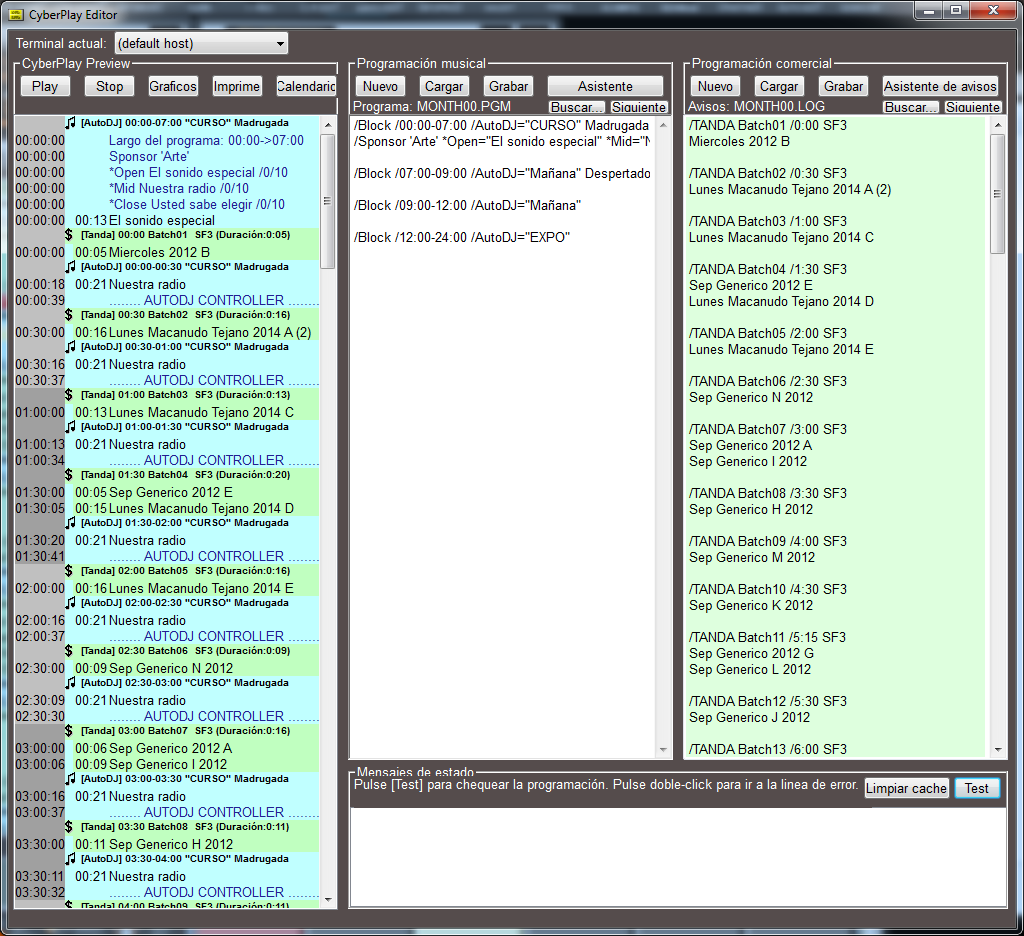
LOG and PGM Files – Programming Schedule
Air dates for breaks (.LOG) and programs (.PGM) can be defined as:- For a specific date (e.g.: 1998-12-25).
- For a weekday of a month (e.g.: all Mondays in April).
- For a fixed weekday (e.g.: every Monday of the year).
- For a month (e.g.: August).
- For an entire year.
PGM/LOG Loading Priority Order
When CyberPlay on-air module builds programming, it loads PGM and LOG in this order:YYYYMMDD.LOG/YYYYMMDD.PGM
Year-Month-Day (e.g.:20040501) for May 1st, 2004.WED11.LOG/WED11.PGM
All Wednesdays in November.SUN00.LOG/SUN00.PGM
Any Sunday of the year (00means “all”).MONTH04.LOG/MONTH04.PGM
All April.MONTH00.LOG/MONTH00.PGM
Every day of the year.
Abbreviations: SUN Sunday, MON Monday, TUE Tuesday, WED Wednesday, THU Thursday, FRI Friday, SAT Saturday, MONTH Month.
Programming in the On-Air Manager
The On-Air module loads each day the programming for the next day using LOG/PGM and the previous priority order. E.g.: on 08/14/2005 it can load980814.LOG (day’s breaks) and MONTH08.PGM (August program blocks).
Automatic loading occurs at 18:00 (configurable in Configuration Panel).
If modified:
- Current day files
- Next day files after automatic reload time
Perform periodic backups of
If accidentally deleted, programming is lost.
C:\Audicom\LOG and C:\Audicom\PGM (default locations).If accidentally deleted, programming is lost.