

General Concepts
CyberPlay automatically creates the radio’s daily event schedule with exact timing.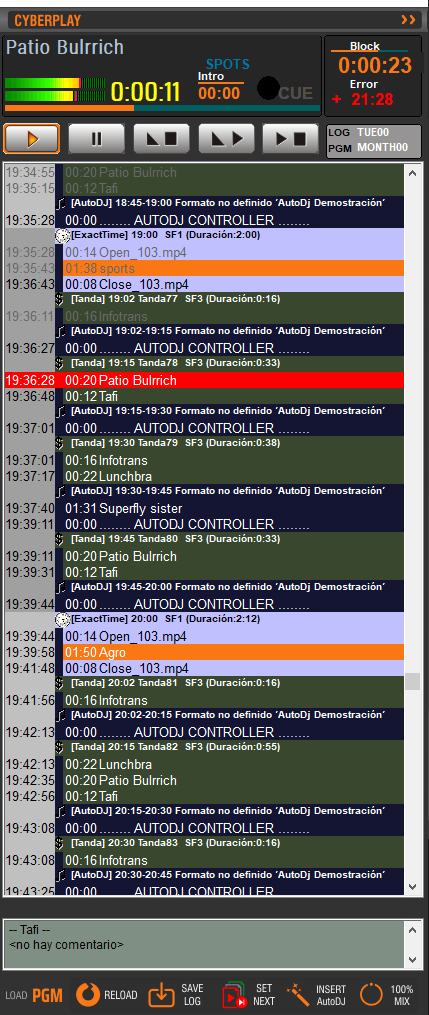
- The window displays the complete programming grid from 00:00 to 24:00, including all events, not just computer-controlled ones.
- Traditional programming blocks are preserved: live shows, news, reports, remote connections, etc.
- Commercial break mode, managing only advertising blocks.
- Full mode, based on the PGM programming grid.
- These are created using simple commands in the CyberPlay Editor module.
- Special day templates can also be defined.
YYMMDD.LOG (Year, Month, Day).
CyberPlay merges and displays both lists (commercials and programming) as a single unified list.
CyberPlay loads the LOG and PGM files at 18:00 each day.
This time can be modified from the Configuration Panel.
This time can be modified from the Configuration Panel.
- The list can be navigated using the scroll bar.
Color Identification
Different content types are distinguished on screen by colors:- Green: commercial break
- Yellow: live block
- Blue: AutoDJ block
- Pink: remote link (satellite or Internet)
- Purple: Exacttime
- Black: pause (stop point)
Time Identification
- Even hours: light gray background
- Odd hours: dark gray background
- Previous day: hours in blue
- Current day: hours in black
- Next day: hours in red
Playback Cursor
- Red line indicates the title currently playing
- Played titles appear in gray
- Cursor has automatic centering, returning to screen if hidden
- If an item is selected, cursor changes to yellow and centering is temporarily suspended for 1 minute
- An arrow on the vertical bar indicates if the playing title is out of view Clicking the arrow forces centering on the playing title.
Commercial Blocks
Contains advertisements. Each block equals one commercial break. Block example: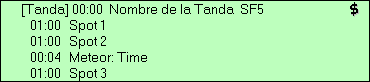
Program Blocks
Correspond to radio content:- Live shows
- Automated music programming (AutoDJ)
- Remote links (satellite or Internet)
For more information about organizing programming, see the Programming Schedule chapter.