Introduction
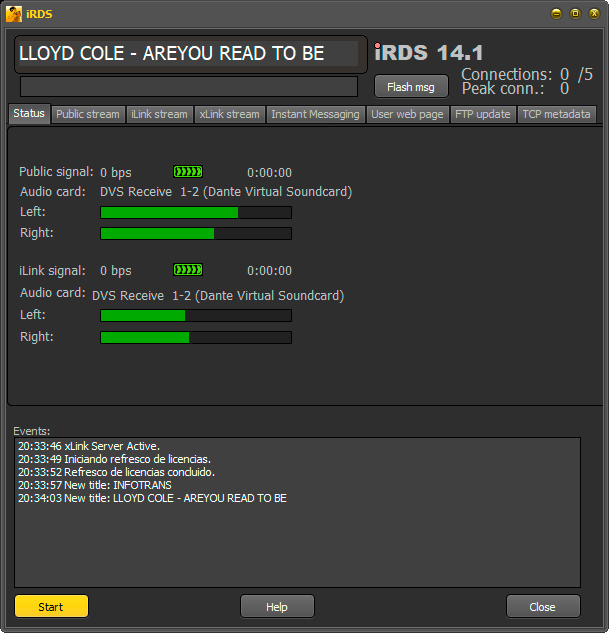
The iRDS Control centralizes the station’s streaming functions. It connects to the streaming server and delivers the digitized signal for online distribution.- Allows simultaneous encoding in two qualities:
- Public: lower quality, intended for Internet listeners.
- iLink: high quality, for inter-station links.
- Both signals include metadata:
- Public stream: sends Artist + Title, similar to RDS system.
- iLink signal: adds precise synchronization (< 0.1 s), ensuring each repeater broadcasts local commercials, promos and weather reports, creating the feeling of a live program in each city.
Audio for Internet Listeners
- iRDS generates a WMA stream (Windows Media Audio) and transmits it through port 8080.
- Besides audio, it transmits Artist and Title, visible in the end user’s player.
- The stream is not distributed directly: it requires a contracted streaming server that redistributes the audio to listeners.
- The simultaneous user capacity depends on the contracted plan.
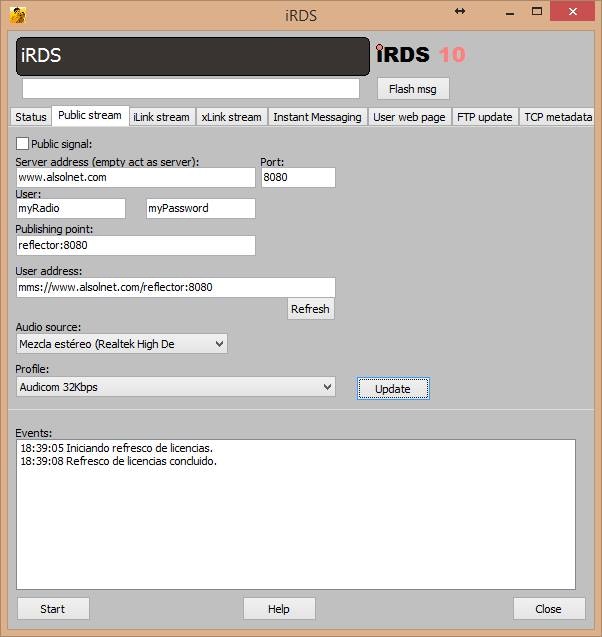
- Check Public Signal to enable streaming.
- If unchecked, no transmission occurs.
- Displays currently playing Artist + Title.
- Flash msg field: sends instant messages to listener’s player.
- Public signal: enables transmission to server.
- Server address / Port: server URL + port.
- If empty, iRDS can act as server (testing only).
- Publishing point: stream identifier (e.g.
FM102,Radio_Cultura). - User address: automatically generated address (e.g.
mms://encoder.iviplanet.com:8080/AUDICOM). - Audio source: take processed on-air signal (from tuner or dedicated Internet processor).
- Profile: WMA encoding.
- 48-64 kbps: standard.
- Higher bitrate means fewer simultaneous listeners (limited by server bandwidth).
AAC+ Transmission over Icecast
To transmit to Icecast servers, an external encoder linked to metadata is required:1
Install external encoder (EdCast)
Configure the encoder to transmit to Icecast server.
2
Verify AUDICOM version
Must be 8.322 or higher.
3
Encoder auto-start
In
Start > Programs > Startup, create shortcut to EdCast to run with Windows.4
Configure RDS
Set RDS to save Title + Artist information to
shoutcast.txt.5
Encoder integration
Configure EdCast to read
shoutcast.txt every 2 seconds and add that metadata to stream.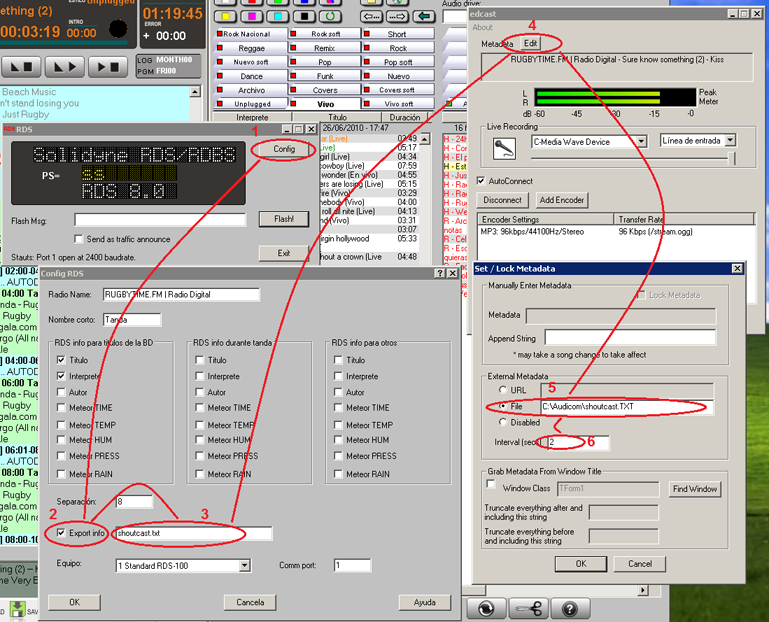
The stream played in Winamp or Windows Media Player will display song names or station name, according to applied configuration.
How to Listen to the Stream
The listener accesses the stream through the radio’s website, where an audio player must be configured with the contracted streaming server parameters.Generate Website from iRDS
As a quick alternative, iRDS automatically generates a basic page with an embedded player. This allows publishing the stream in seconds, without requiring prior web development.The function is detailed later in this chapter.
Audio for Inter-station Links (iLink)
The iLink signal allows transmitting high-quality audio along with synchronization metadata, used in repeaters to manage regional programming.- Direct connection: up to 5 remote terminals, no web server required.
- More than 5 terminals: requires streaming server with WMA support.
- Activation: check iLink Signal.
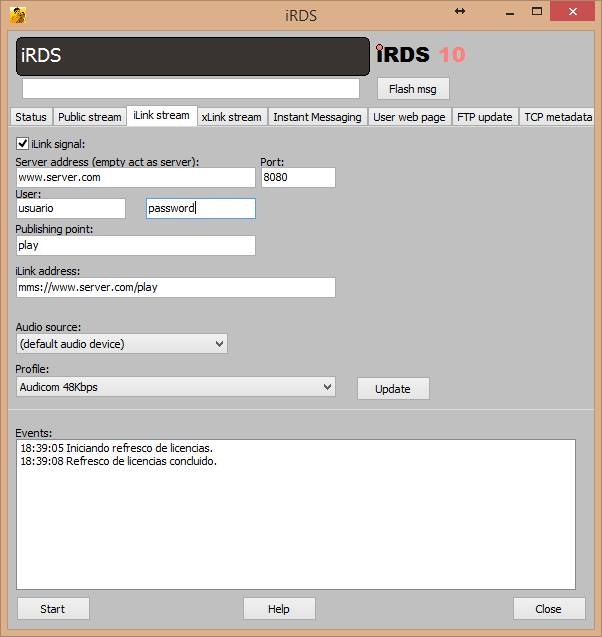
- Server address/Port: usually blank. Only needed if using external server. Default port: 8081.
- iLink address: address where repeaters connect.
- Audio source: external input with complete program signal.
- Profile: recommended bitrate: ≥128 kbps for high-quality links.
- Public streaming:
mms://machineName:8080orhttp://machineName:8080 - iLink streaming:
mms://machineName:8081orhttp://machineName:8081
xLink — Zero-delay Link
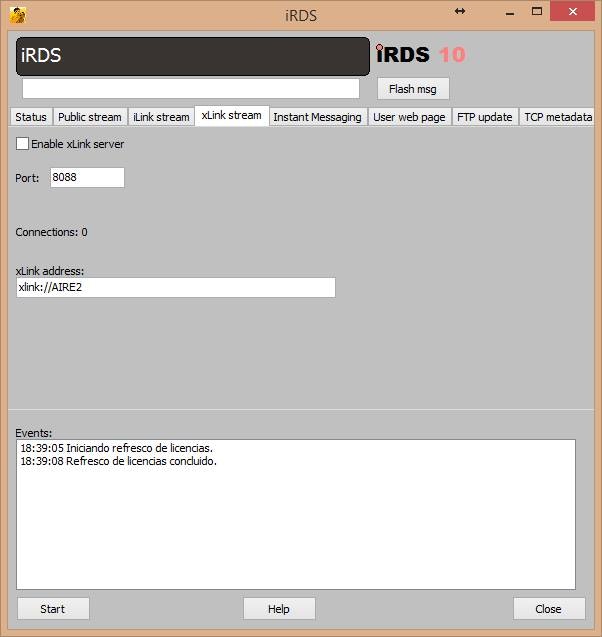
xLink mode transmits metadata only, allowing the repeater to broadcast without delay.- Usage: when repeater is in same building and receives audio through physical connection (analog or digital).
- Activation: check xLink Signal.
- Operation: repeater receives audio through local input and metadata via LAN, replacing commercials and station IDs as appropriate.
Reception at Remote Station
At regional station:- iLink/xLink signal is received through AUDICOM Multicast iLink module.
- Repeater must have own material (ads and station IDs) to replace elements from head-end.
- Reception programming is detailed in next chapter section.
Automatic Website
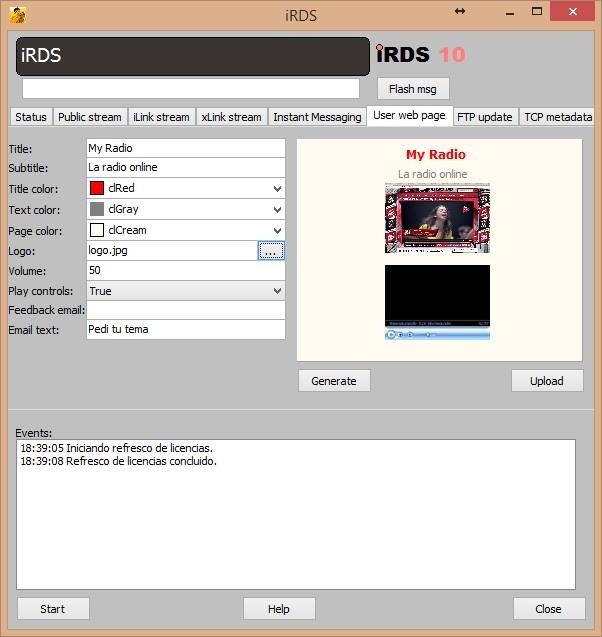
iRDS can generate a basic transmission page with integrated player, useful as temporary or test solution.- Uses server data defined in Public Signal.
- Page is created in seconds and allows listening to stream without additional configuration.
Publishing the Page
A web hosting with access username and password is required for publishing.- From iRDS, press UPLOAD and upload generated page.
- Access:
http://your_website_domain/AUDICOM/player.htm- Example:
http://www.radioeter.com/AUDICOM/player.htm
FTP Update
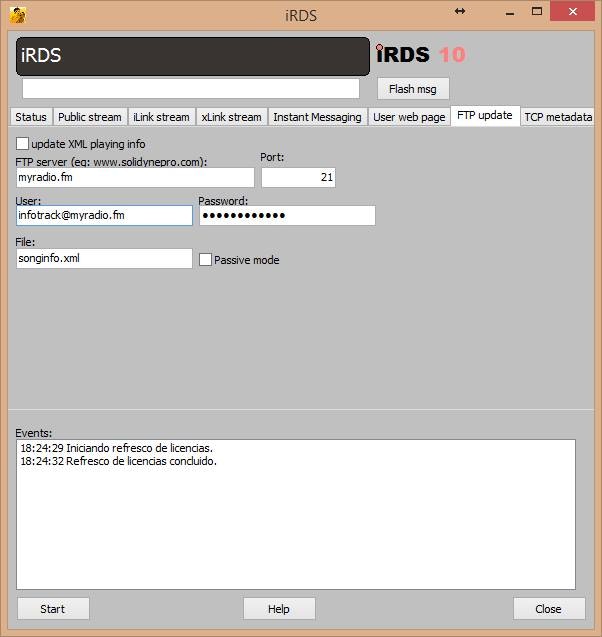
Function that exports playback metadata (Artist/Title) to an XML file on an FTP server.- Usage: automate information on station’s website.
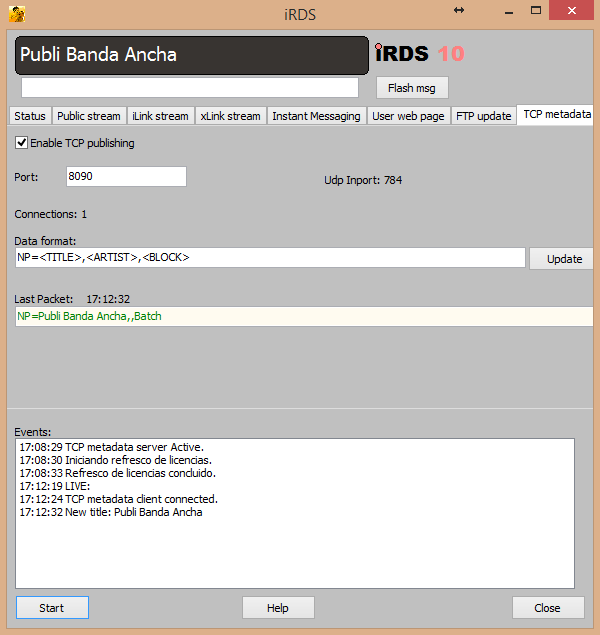
TCP Metadata
Allows transmitting real-time metadata through a TCP port on local network, for integration with third-party applications. Available options (between< >, comma-separated):
<TITLE><ARTIST><BLOCK>(CyberPlay block type: AutoDJ, Live, Spots)<CLASS><STYLE>
NP=<BLOCK>,<ARTIST>,<TITLE>,<CLASS>
Example real output:
- Music track:
NP=AutoDJ,KATY PERRY,Unconditionally,Musica - Commercial spot:
NP=Batch,,Publi Banda Ancha,
Subscribe via TCP to port 8090 on machine running iRDS (usually Air PC, unless using dedicated server).