

It’s easy to configure and enables automation of tasks like:
- Switching the processing preset remotely.
- Changing transmission mode between stereo / mono.
- Manually.
- Scheduled, according to a time schedule.
Download and installation
- The application can be downloaded for free from:
👉 https://www.solidynepro.com/DW/lite.rar - Compatible with Windows 10, 11 and Windows Server editions (32 and 64 bits).
- The installer allows configuring auto-start from Windows Start menu or creating a Desktop shortcut.
- Alternatively, the executable can be copied to any folder and run directly.
- No administrator permissions required.
- Application:
C:\Program Files (x86)\Solidyne 542 Lite commander - Data:
<appData>\Solidyne(example:C:\Users\Usuario\AppData\Roaming\Solidyne)
- Discovery →
30303 UDP - Application →
80 TCP - Default TCP timeout →
1000 ms
The application is designed to control a single unit at a time, although multiple instances can be run to control more than one 542APC.
Main screen
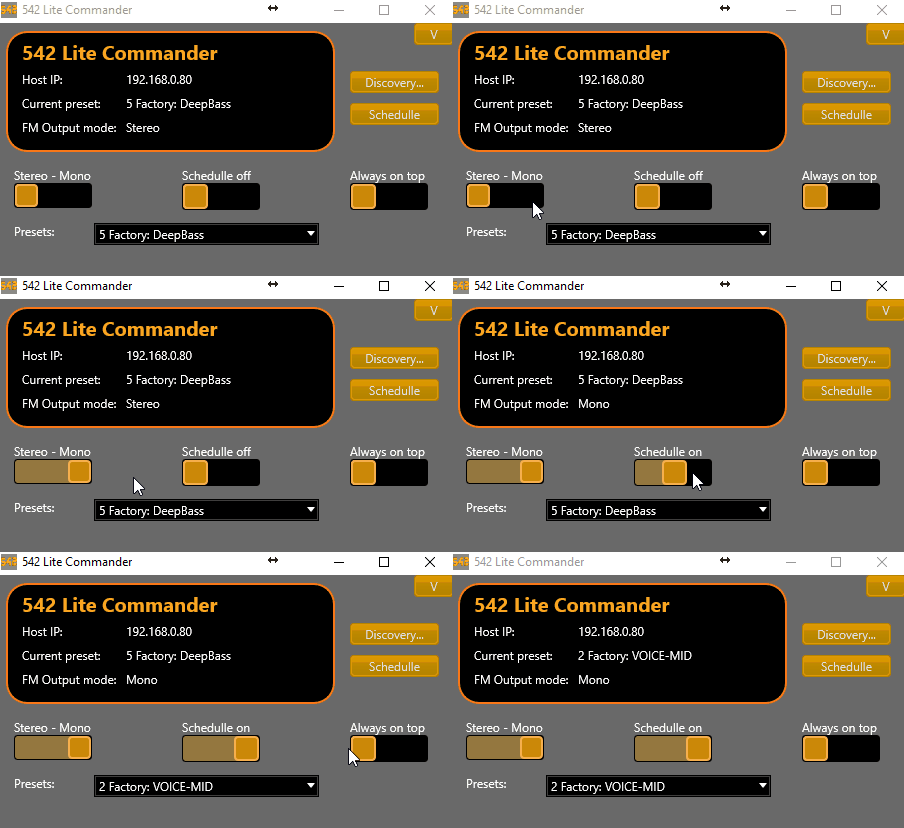
The main screen displays:- Host IP of the selected unit.
- Current processing preset.
-
FM mode status (Mono / Stereo).
Main controls
- Switch Stereo–Mono: shows and toggles transmission mode.
- In MONO the 38 kHz subcarrier is suppressed.
- See details in About MONO transmission
- Switch Schedule: enables/disables time scheduler.
- Always on top: keeps application visible while using other software.
- Presets: Allows switching processing preset. The change takes place immediately.
Preset or mode changes made from the unit’s front panel are also reflected on this screen. - Available buttons:
- Discovery → opens LAN unit search screen.
- Schedule → opens time schedule editor.
Schedule
The Schedule window allows creating a time schedule:- Defines which preset and transmission mode (Stereo/Mono) will be applied according to day and time.
- All available presets are listed on the left.
- Schedule is configured by hours and days on the right.
Main functions
- Set preset → schedules a preset at a specific time.
- Set mode → schedules transmission mode.
- Clean preset / Clean mode → removes scheduling.
Week.sch→ Monday through Friday.Saturday.sch→ Saturdays.Sunday.sch→ Sundays.
Files for specific days can be created (e.g.:
Just copy
Monday.sch, Tuesday.sch).Just copy
Week.sch and rename it with the desired day.Discovery
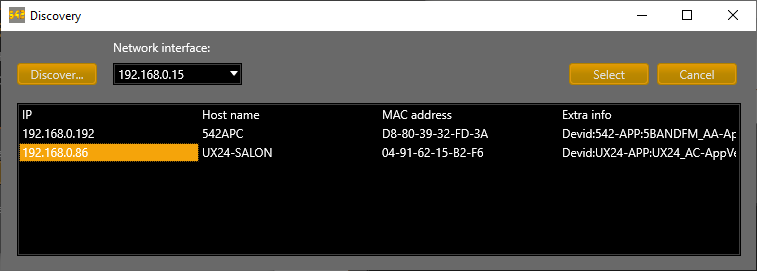
- Sends a broadcast message on the LAN to locate 542APC units.
- If the unit was powered off, repeat search with [Discovery] button.
- Found units are listed with:
- IP address
- Host name
- MAC address
- Device details
- If multiple network interfaces exist on the PC, network card can be selected for search.
- Select a unit from the list and press [Select] to control it.
- Selected IP is saved in
V-RACK.INIfile for later use on restarts.