

RDS
The 542APC processor includes an internal RDS encoder.RDS is a system that adds supplementary information to the FM signal through a data channel. Its main functions include:
- On-screen display of the station network name and program type (news, sports, music, variety, religious, etc.).
- Automatic tuning to a station network selected by the user.
Allows listening to the same station during a long trip without manually changing frequency when one station’s signal weakens. - Automatic reception of traffic information.
The receiver switches within the same network to the station broadcasting traffic information and then automatically returns to the previously selected station.
Basic RDS Configuration
RDS configuration and control is done via Ethernet (IP) through the 542APC’s ETHERNET port.Basic parameters are set from the web interface under FM OUTPUT, which shows a diagram with RDS and access to its configuration.
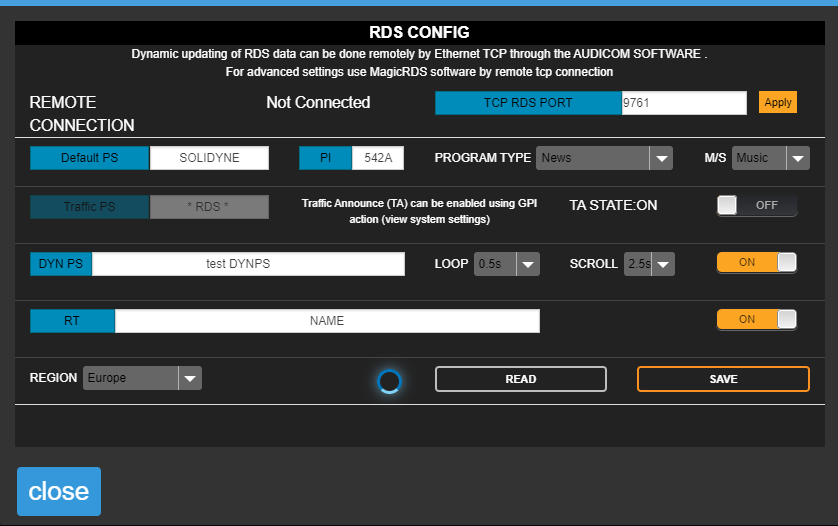
Configurable Parameters
-
TCP RDS PORT
Defines the TCP port for communication with external RDS software.
Default value:9762.
To modify it, enter the new value and press APPLY.To control the RDS encoder in real-time, for example to send current song information, an external computer running Magic RDS or Solidyne Audicom software is required. -
Default PS (Program Service)
Static text, typically the station name.
Maximum length: 8 characters (per RDS standard). -
PI (Program Identification)
Identifies a network of stations or repeaters in a chain, allowing the receiver to switch automatically based on reception quality.
Format: 4-digit hexadecimal number (0000 to FFFF). -
Program Type
Defines the type of broadcast content (e.g., news, sports, music). -
M/S (Music/Speech)
Indicates whether the content is music or speech. -
TA State (Traffic Announcement)
On/off flag indicating when traffic announcements are on-air.
Controlled manually or via remote GPI. -
Traffic PS
Displayed instead of PS field when traffic flag is active.
Leave blank if not used. -
DYN PS (Dynamic Program Service)
Allows displaying dynamic messages (up to 64 characters) by sequentially replacing the static PS. Usage examples: song titles, artist, news, commercials.
Text scrolls at the speed defined in the Scroll field. -
Loop
Time between dynamic text repetitions. During this period, the static PS is shown. -
Scroll
Scrolling speed (high or low).
High speed may not be compatible with some receivers, especially in cars or areas with poor reception. This is because PS scrolling is not included in the RDS standard. High speed should be avoided.
Dynamic PS usage is restricted in some countries and is not part of the RDS standard.
Some receivers may not properly display Dynamic/Scrolling PS.
The manufacturer is not responsible for improper use of this feature.
Some receivers may not properly display Dynamic/Scrolling PS.
The manufacturer is not responsible for improper use of this feature.
Advanced Usage with Magic RDS
For advanced functions, external Magic RDS software (Windows) is required, connected to the same network as the 542APC.This software allows dynamic data updates (e.g., song titles) from various playout automation systems.
Audicom Integration
If the station uses Solidyne Audicom, Magic RDS is not necessary. Communication is direct between Audicom and the processor via LAN. For more details, consult the Audicom documentation.Magic RDS Installation
A version of the software can be downloaded at:www.solidynepro.com/DW/setupRDS.rar
Configuration steps (valid only for the version distributed by Solidyne):
- Install and run Magic RDS.
- Go to Options → Preferences.
- In the preferences window, select the General tab.
- Change connection type to Ethernet TCP/IP.
- In Port, enter the TCP configured in the 542APC (default 9762).
- In Host, enter the 542APC’s IP address (visible on the unit’s display).
Remote Access
The processor can receive RDS data via Internet when located on another network.Requirements:
- ISP must assign a static IP on the remote LAN.
- Configure LAN port forwarding:
- Port 80 → 542APC local IP
- Port 9762 (or other configured for RDS) → 542APC local IP