

Introduction
Processing stages are accessed from the SETUP screen, PROCESS option in the side menu.- Different stages are grouped in tabs.
- The left-to-right order corresponds to the actual signal flow, except for WIZARD, which is not a processing stage itself.
- WIZARDS
- ENHANCERS
- ENHANCER EQ
- AGC
- MULTIBAND AGC
- MULTIBAND LIMITER
- MIX & CLIPPER – FINAL LIMITER
WIZARD
The WIZARD controls work on user presets.They allow you to quickly change the sound character and create new presets without modifying each individual stage.
- No advanced knowledge required.
- Related: see Preset Management.
- Modify a preset’s character in four essential aspects:
- BASS
- BRIGHT
- COMPRESSION
- LOUDNESS
- Toggle and basic adjustment of ENHANCERS:
- Voice Symmetrizer
- EQ
- Bass Enhancer
- Stereo Enhancer

Control Interaction
- The four controls are interrelated: a single parameter can be affected by more than one control.
- When one control is moved, the positions of others are recalculated.
- When loading a preset, controls are positioned according to its settings.
Usage Tips
- Use WIZARD for moderate changes.
- Always start from a preset close to the desired result.
- Example: if seeking maximum loudness, don’t start from a soft preset and maximize LOUDNESS.
- It’s recommended to start from a MaxLoudness type preset, already optimized for that goal.
Advanced users can adjust each stage individually for greater sound precision.
Enhancers
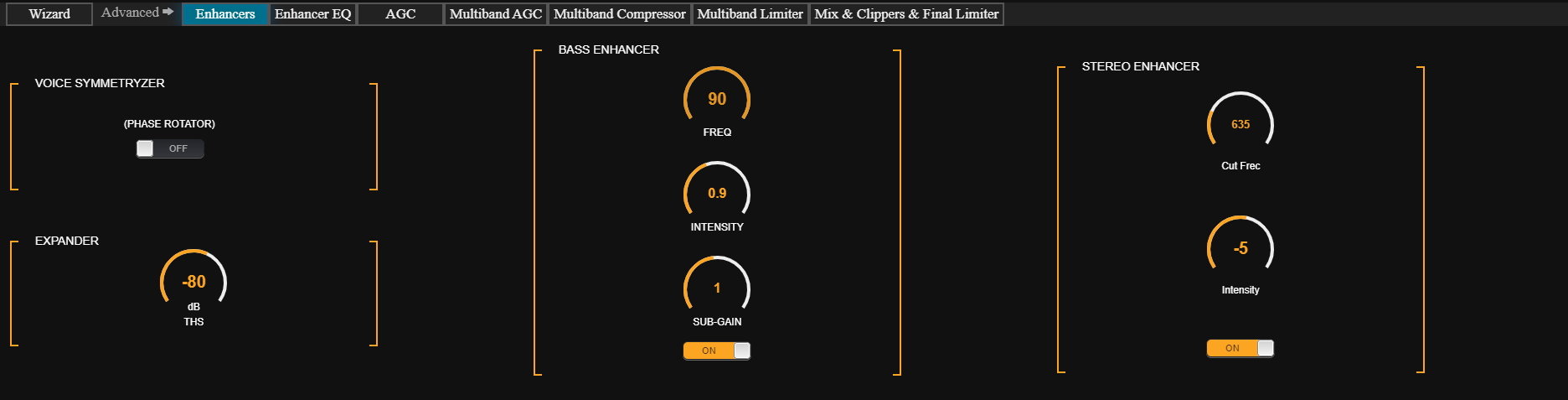
Voice Symmetrizer
Human voice is asymmetric due to vocal cord nature (asymmetric triangular pulses). This asymmetry remains after vocal cavity filtering. As a result, when passing through a compressor:- One polarity reaches 100%, while the opposite rarely exceeds 50%.
- Voice is perceived less intense than music, which is more symmetric.
Technique based on Dr. Kahn’s discoveries and developed by Eng. Oscar Bonello.
Reference: Journal of the AES, Vol.24, No.5.
Reference: Journal of the AES, Vol.24, No.5.
Expander
- Its purpose is to improve the signal-to-noise ratio (S/N) of the on-air sound.
- Multiband compression increases loudness but reduces S/N.
- Without an expander, noise floor might be audible during long voice pauses.
- THS (Threshold): adjusts in dBFS the level at which the expander starts reducing gain.
Bass Enhancer
- Reinforces mid-bass (50 – 300 Hz), improving presence on small speakers.
- Unlike an EQ, it synthesizes and adds harmonics from lower frequencies.
- FREQUENCY: low-pass filter cutoff frequency (defines harmonic range).
- INTENSITY: amount and intensity of generated harmonics.
- SUB-GAIN: level of synthesized bass added to the signal.
When using preset switching for voices, music and voice settings should have BASS ENHANCER in the same condition (active or inactive).
Stereo Enhancer
- Provides a more immersive sound, making the station stand out against conventional broadcasts.
- This effect helps increase perceived loudness.
- The effect is more noticeable on headphones.
- Uses a stereo expansion algorithm to simulate surround sound in two-channel systems.
- Cut Freq (Hz): low-pass filter cutoff frequency defining the phase-shifted signal range. Hearing is more sensitive to phase differences below 2000 Hz → increasing phase difference widens stereo image.
- Intensity: level of expanded signal added to original audio.
In voice-switched presets, music and voice should maintain Stereo Enhancer in the same condition (enabled/disabled).
Enhancer EQ
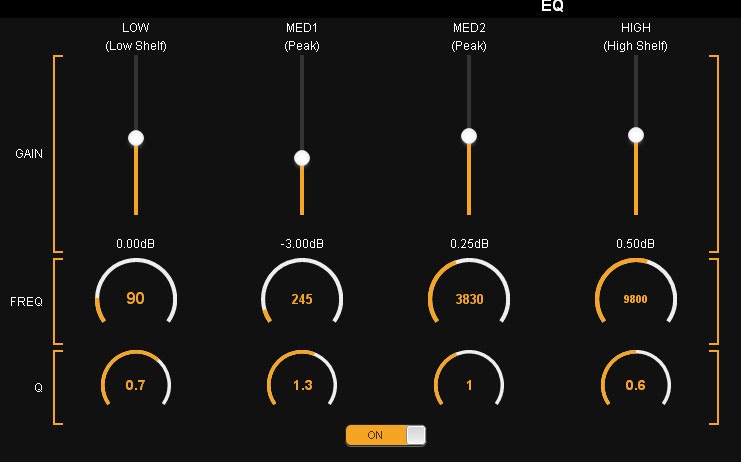
- Q=3 → width ≈ ½ octave.
- Q=4 → width ≈ ⅓ octave.
- The correction affects ≈ 50% of that band (125-375 Hz).
- Higher Q means more specific correction.
- With Q=0.5 → width of 500 Hz, affecting LOW and M1.
In some cases, applying correction from either the parametric EQ or the multiband density EQ may be preferred, depending on the desired effect.
Both produce subtly different results.
Both produce subtly different results.
Recommendations
- Use parametric EQ for very specific cuts or boosts.
- The global equalization profile should be defined with multiband AGC and density EQ.