

General System Settings
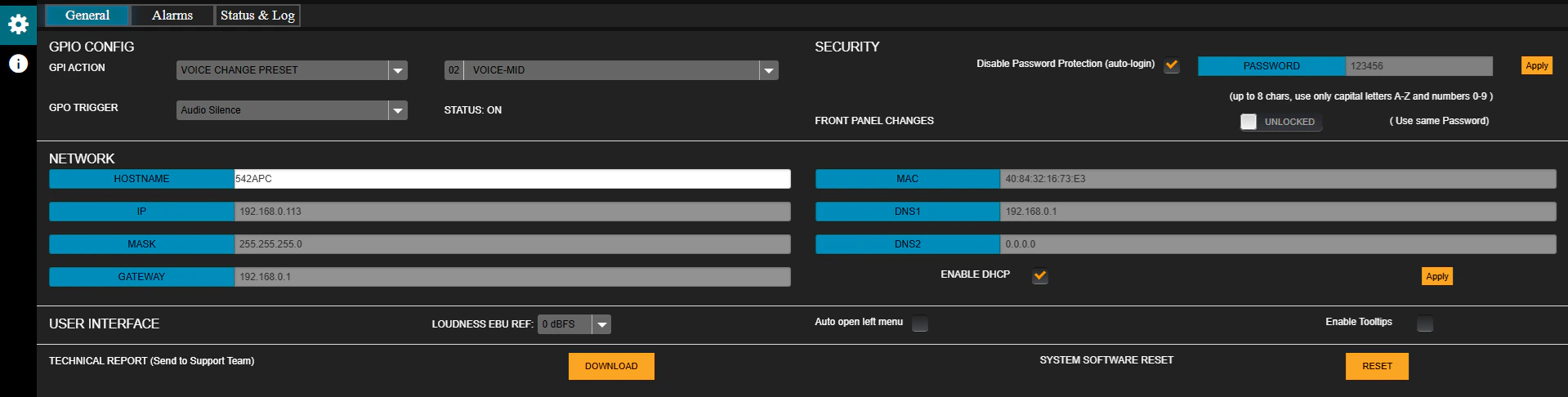
GPIO CONFIG
- GPI VOICE CHANGE PRESET:
When the GPI is activated, it switches the processing preset.- The trigger signal is generated in the Studio when microphones are enabled.
- It can reach the processor via hardware connection or LAN (models with /AoIP option).
- The field on the right defines the preset to apply (default: VOICE-LOUD).
- GPO TRIGGER:
List of events that can activate the GPO output:- AUDIO SILENCE
- INPUT FAIL BACKUP
- OVERMODULATION
- LOW RF POWER
- FORCE FM MONO
See details on GPIO connection
SECURITY
Allows enabling a password by unchecking the Disable Password Protection option (default: enabled).- Default password:
1234. - To modify it, enter the new password in the PASSWORD field and press APPLY.
- Rules: up to 8 characters, only UPPERCASE letters and numbers.
- FRONT PANEL CHANGES (LOCK/UNLOCK):
Locks or enables access from the front panel.
If locked, the password is required to make changes from the front.
NETWORK
Network configuration.- Factory default: DHCP enabled mode.
- A static IP can be assigned by disabling DHCP.
- The IP address is displayed on the front panel or via LAN using the Solidyne Multi-Discovery tool.
For more details, see Ethernet Connection and Access.
User Interface
- LOUDNESS EBU REFERENCE: Loudness reference level for general monitoring (default: 0 dBfs).
- AUTO-OPEN LEFT MENU: Automatically expands the menu when hovering the mouse.
- ENABLE TOOLTIPS: Enables help pop-up messages for controls and indicators.
TECHNICAL REPORT
Generates a report with the equipment’s operating parameters and configuration.- Pressing “DOWNLOAD” saves the report to the browser’s downloads folder.
- It can be sent to technical support for diagnostics.