

Alarms
Access via SYSTEM → ALARMS tab.Alarm-triggering parameters are based on the FM tuner signal.
- If RF Level < 40 dB or multipath > 10%, measurements are invalid.
- In such cases, fields appear grayed out and no alarms are generated.
- AUDIO SILENCE
- OVERMODULATION
- LOW RF POWER
Alarm Configuration
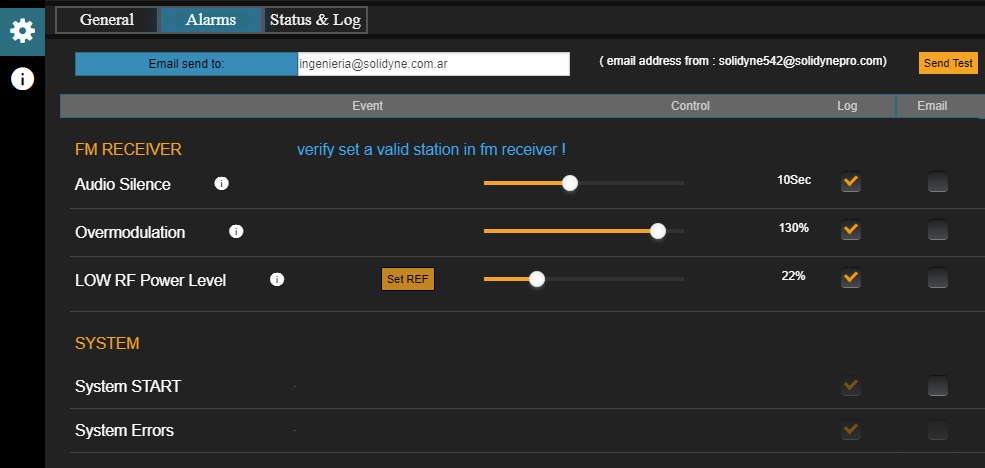
- E-mail Send To → address where alerts will be sent.
- “Send Test” sends a test email.
To send alerts to multiple addresses, use the auto-forwarding (mail forwarding) function in the configured email account.
- LOG and E-MAIL checkboxes → enable logging to internal memory and/or email sending.
Alarm Types
- AUDIO SILENCE:
- Triggers when the signal falls below the threshold defined in Fail Backup.
- The time limit (seconds) is adjusted via slider control.
- Important: analyzes the FM Receiver post-Gain signal, so gain affects detection.
- OVERMODULATION:
- Activates if modulation exceeds the defined alarm value.
- This setting does not affect transmission, only detection.
- LOW RF POWER LEVEL:
- Triggers when low transmission power is detected.
- Procedure: press Set REF under normal conditions. Then define the % loss that triggers the alarm.
- Does not affect transmission.
- SYSTEM START:
- Generates alarm when the unit restarts (e.g., after power loss).
- SYSTEM ERRORS:
- For internal use only. Events are logged in SYSLOG.
Status and Logs

- SYSTEM STATUS
- Shows running modules and indicates normal operation (Main Processor, Stereo Generator, FM Monitor, RDS, and AoIP/Streaming).
- SYSLOG:
- Event log in internal memory.
- Reserved for qualified personnel for diagnostics and technical support.
- SYSTEM TIME:
- If the unit has internet access, synchronizes time with an NTP server.
- Can also sync from a PC using SYNC FROM PC.
- Date and time are used only for reports and logs.