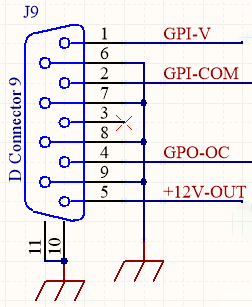
The General Purpose Input (GPI) allows switching to an optimized voice processing preset when microphones go on-air.GPI is activated by applying a voltage between 5 and 15 volts to PIN-1. It does not use internal ground reference. PIN-2 connects as GPI-COM to the external signal. This prevents feedback loops that could generate noise.GPI is non-polarized - activation occurs with either positive or negative voltages within the operating range.When GPI voltage is zero, processing returns to the main preset. Preset switching is indicated on the unit’s OLED display.When installing the Solidyne 542APC in studios, GPI triggering can be achieved by directly connecting the console’s on-air light voltage output to the 542APC’s GPI.
Verify that the console’s tally light voltage is within the supported range (5-15 VDC).When the Solidyne 542APC is at the transmitter site, GPI triggering can be achieved using a remote contact (relay) from the Studio-Transmitter Link if the equipment provides it.
The General Purpose Output (GPO) allows controlling an external device based on specific processor conditions.It connects to PIN 4 of the DB9. It is a normally-open “Open Collector” contact that closes (connects to chassis ground) when active. Maximum current rating is 100 mA.The conditions that activate the GPO are set through the Web Control interface under the CONFIGURATION menu option.